
For the latest information on everything video encoding; check out our ultimate guide Video Encoding: The Big Streaming Technology Guide [2023]
TL;DR
- Video encoding compresses raw video into efficient digital formats using codecs to reduce file size while preserving perceptual quality for streaming and storage
- Bitrate directly impacts video quality and bandwidth consumption. Higher bitrates typically deliver better visual fidelity but require more network capacity
- Adaptive Bitrate (ABR) streaming dynamically switches between multiple encoded renditions based on real-time network conditions and device capabilities
- ABR improves Quality of Experience (QoE) by minimizing buffering, startup delay, and playback interruptions through client-side bitrate adaptation
- An optimized encoding ladder (multiple resolutions and bitrates) is critical for balancing compression efficiency, device compatibility, and scalable content delivery
Welcome to our encoding definition and adaptive bitrate guide.
This article is for anyone seeking a way into the world of Video Technology and Development, or for those of you looking for a quick refresher on the key terms that define the industry.
You’ll learn exactly what encoding is and some of the most important factors within the encoding process.
Let’s get started.
Table of Contents
What is a Codec?
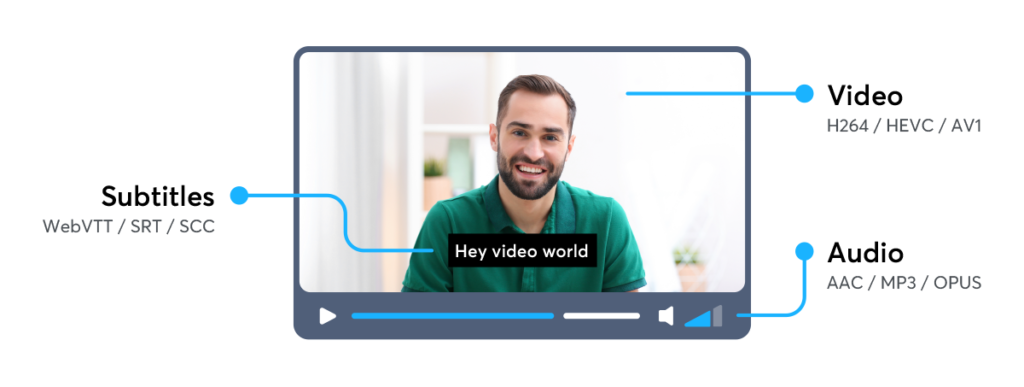
A codec is a device or a program intended to compress raw media files (ex: video, audio, and/or subtitles). There are multiple variations of codecs for each file format; common examples of video codecs include: H.264, HEVC, VP9 and AV1.
For audio there are: AAC, MP3 or Opus. A few essential codecs are visible in the image below:
The purpose of a codec is to efficiently and quickly transfer, store or play back a file on a device. The process of compressing these raw or uncompressed files into a codec is known as encoding.
What is Encoding?
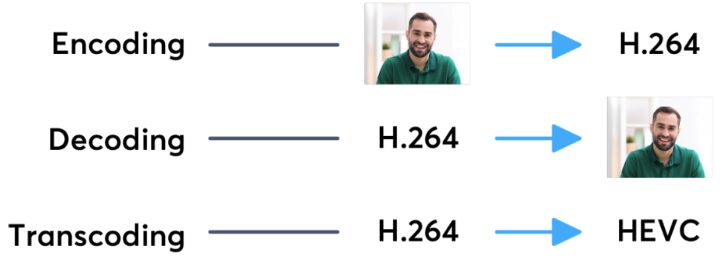
Encoding is the process of converting a raw video file (codec) into a compatible, compressed and efficient digital format. The new compressed file is capable of distribution across the web and playback in mobile or TV players.
For example: A multimedia conglomerate could be tasked with distributing OTT content like Game of Thrones to a commuter’s mobile device in a region that may have slower internet/data speeds. This transmission would therefore require a lot of back-end communications and encodes; where distributing an individual episode at the highest quality (recording quality of cameras), would be highly inefficient & expensive.
A solution is to run these ultra high quality videos through a video encoder during the processing phase. This packages the requested video files in a way that will lose minimum quality during the transmission, otherwise known as “semi-lossless compression”.
From a technical perspective, an example of encoding would be the delivery of a single uncompressed RGB 16-bit frame, with a size of 12.4MB to a Monochrome 8-bit frame with a size of 3.11MB.
If you are reading this from Europe – the standard is 25 frames per second (FPS), whereas videos in the US run at 29.97 FPS. So, for 60 seconds of video at 24 frames per second an encoding software would bring the total size of the video file down from 17.9GB to 2.9GB.
However, 3GB for 60 seconds of video may still be too much to stream from your phone while you are attempting to watch something on the bus to work, so further optimization is needed.
What is Transcoding?
A more complex variation of encoding is transcoding, the process of converting one codec to another (or the same) codec. Both decoding & encoding are necessary steps to achieving a successful transcode.
Transcoding is a standard practice for online video – the process of compressing an already compressed file. Therefore enabling consumers to access higher quality experiences at significantly lower costs of distribution.
In other words, more steps are necessary to deliver that high quality video to multiple devices. Additionally, an encoder can implement frame size reductions to maximize the perceived quality of your average consumer.
So, how does one further compress a data file?
Using a command line interface, encoders like Bitmovin, who provide both API and GUI encoder products, analyze and process all inputted video files.
Depending on which resolution is needed in the output file, a different video codec is used. The best video codec is one that encodes video for the specific resolution and format that optimizes for best perceived quality in the smallest possible size.
One of the standard metrics of measurement for video quality is the peak signal-to-noise ratio (PSNR): the comparison of “good data” against how much noise there is within the file; the higher the number, the better.
PSNR is measured using decibels (like in sound) and 80db is typically a good magnitude for quality.
However, not all video files are equal, sports and dynamic videos are significantly larger in size and complexity than your average cartoon. As a result, encoders like Bitmovin utilize a further customizable solution, per-title encoding, which tunes each compression to achieve maximum quality, minimum size, and at the lowest cost.
What is Bitrate?
Having learned the definitions of Encoding and Transcoding and how they affect content quality, the next step is defining the basis of measurement for speed and cost in media transmission.
The industry standard, Bitrates, are calculated (and charged) based on the number of bits per second that can be transmitted along a digital network. The higher amount of Bits that can be processed per second are indicative of a faster and higher quality transfer – however this usually comes at a higher cost.
All available bitrates and resolutions that video (and audio) segments are encoded in, as well as their server locations are referenced in a text file defined by either the DASH or HLS protocols. These manifest files (.mpd for DASH, .m4u8 for HLS) are fed into a player; which protocol is used depends entirely on the device capabilities of the consumer.
Bitrate gives a value of how much of the video file (in bits) can we process over time while the video is playing back. However, it doesn’t always make sense to transfer the highest quality to every user and every device.
There are some who will consume the content on a cellular network while in motion (like for our friendly aforementioned commuter) and others who will consume that same content on a 4K TV with a fibre optic connection.
In addition, that same user may start viewing the content on the 4K TV and continue en route to their office on a mobile phone with a 3G network.
Encoding & Bitrates in Action
During an encode, video and audio components are split (a reference is kept for the decode) in 1 second segments; the segment length can be arbitrary, but the maximum is 10 seconds.
Each of these video segments can be saved in a different quality (and frame size) by a video encoder.
The quality and size of the output video is set by selecting a bitrate by a distributing service. In a perfect world, the service provider will select the perfect bitrate for each video to be transferred to the end user that will avoid stuttering or buffering.
You can find a chart of the standard bitrate ladder below as compared to the ladder for Bitmovin’s Per-Title Encoding solution: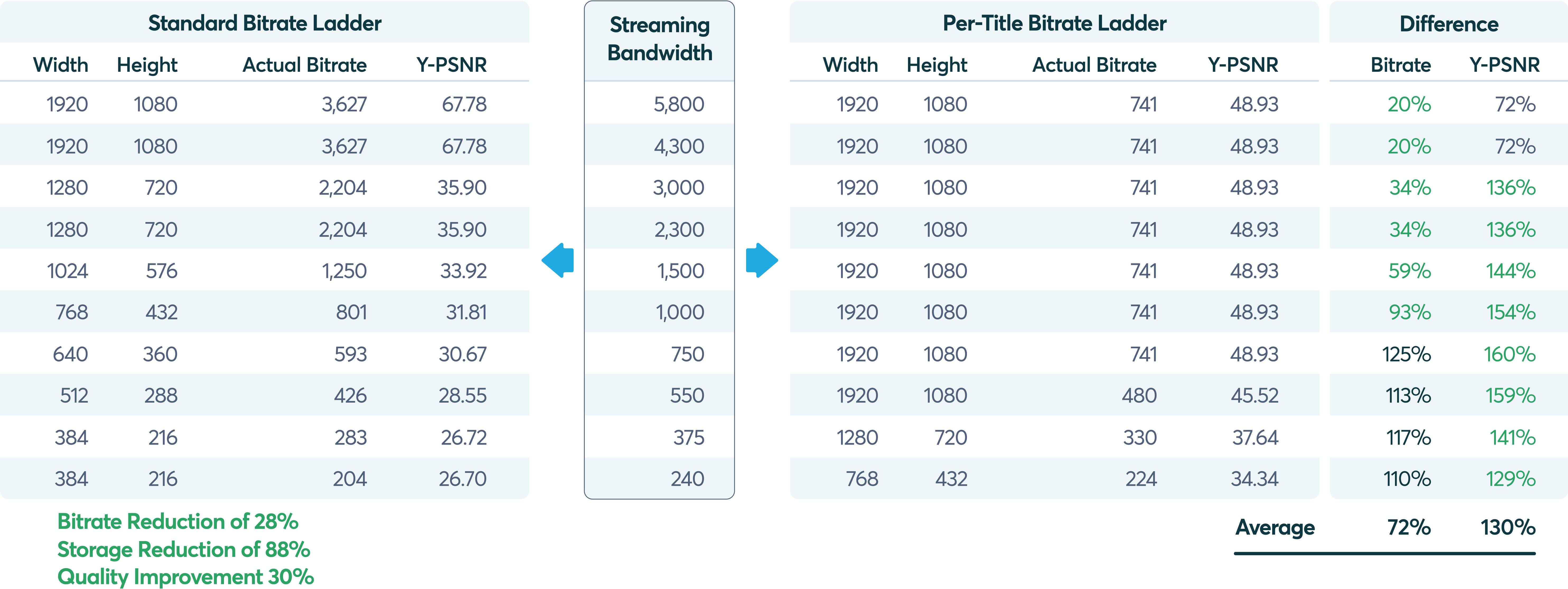
Latest in Encoding Tech: VVC and VP9 codecs
The latest state of the art encoding tech is Versatile Video Coding (VVC); an improvement over Next Gen Open Video or VP9 codec (2013). VVC improves the prediction of the parts (blocks) in a frame by looking at other neighboring blocks and comparing them to what they behaved like before the encode/transcode.
Factors that play into how the VVC function include: the motion of the block with respect to all others (or motion compensation), changes of the block from how it looked in the past, and a prediction of how it will look like in the future (temporal motion prediction).
Future of Video: Common Media Application Format (CMAF)
The future of streaming is driven by CMAF, an encoding method that splits a video file into small chunks.
These chunked files are instantly playable by a consumer, unlike segmented files which need to be fully downloaded before playing.
Think of a flaky connection: high lags with long buffer times, just to download 10 seconds of video. CMAF aims to solve flaky videos with a Common Encryption format to ease the deployment of Digital Rights Management technologies.
We hope you found this encoding definition and adaptive bitrate guide useful. If you did, please don’t be afraid to share it on your social networks!
More video technology guides and articles:
- Back to Basics: Guide to the HTML5 Video Tag
- What is a VoD Platform? A comprehensive guide to Video on Demand (VOD)
- HEVC vs VP9: Modern codecs comparison
- What is the AV1 Codec?
FAQs
What is video encoding?
Video encoding is the process of compressing raw video into a digital format using a codec. The encoder removes redundant information and reduces data size so the content can be efficiently stored and streamed over networks.
What is bitrate in video streaming?
Bitrate refers to the amount of data processed per second in a video stream, typically measured in kbps or Mbps. It determines both the required bandwidth and the resulting video quality.
What is Adaptive Bitrate (ABR) streaming?
Adaptive Bitrate streaming is a delivery technique where multiple versions of the same video, encoded at different bitrates and resolutions, are made available. The video player automatically switches between these versions depending on network throughput and device performance.
How does ABR improve streaming performance?
ABR reduces buffering and playback interruptions by allowing the client to downgrade or upgrade quality on a per-segment basis, depending on current bandwidth conditions.
What is an encoding ladder?
An encoding ladder is the structured set of video renditions (different resolutions and bitrates) prepared for ABR streaming. It defines how content scales across network conditions.