
TL;DR
- Bitmovin’s Player UI v4 is a full visual redesign with a cleaner layout, updated icons, and improved control hierarchy.
- Better viewer experience. Spacing, alignment, and overlays are refined to reduce clutter and keep focus on the video.
- UI components are restructured for easier long-term maintenance and customization.
- Teams on UI v3 can upgrade with minimal changes using the official v3-to-v4 migration guide.
- The updated interface is available to explore in Bitmovin’s Player demo and developer documentation.
Table of Contents
Player interfaces play a critical role in how viewers experience video streaming. According to Nielsen’s The Gauge, streaming accounted for 47.5% of total TV viewing in December 2025, the highest share ever recorded as audiences continue shifting toward digital viewing experiences. As streaming usage grows across browsers, mobile devices, and connected TVs, the usability of the player interface becomes increasingly important. Viewers expect controls to be easy to access, settings to be simple to adjust, and navigation to feel natural regardless of the device they are using. Even small improvements in layout clarity and interaction design can make a noticeable difference in how viewers engage with video.
With the release of UI v4, Bitmovin’s Player (read the developer community post) introduces a redesigned user interface that modernizes the playback experience while improving how viewers interact with controls and settings. The update focuses on a cleaner visual structure and improved interaction patterns across devices. These changes provide streaming platforms with a more polished default interface while giving developers a stronger foundation for customizing the player experience.
A refreshed interface built for modern playback experiences
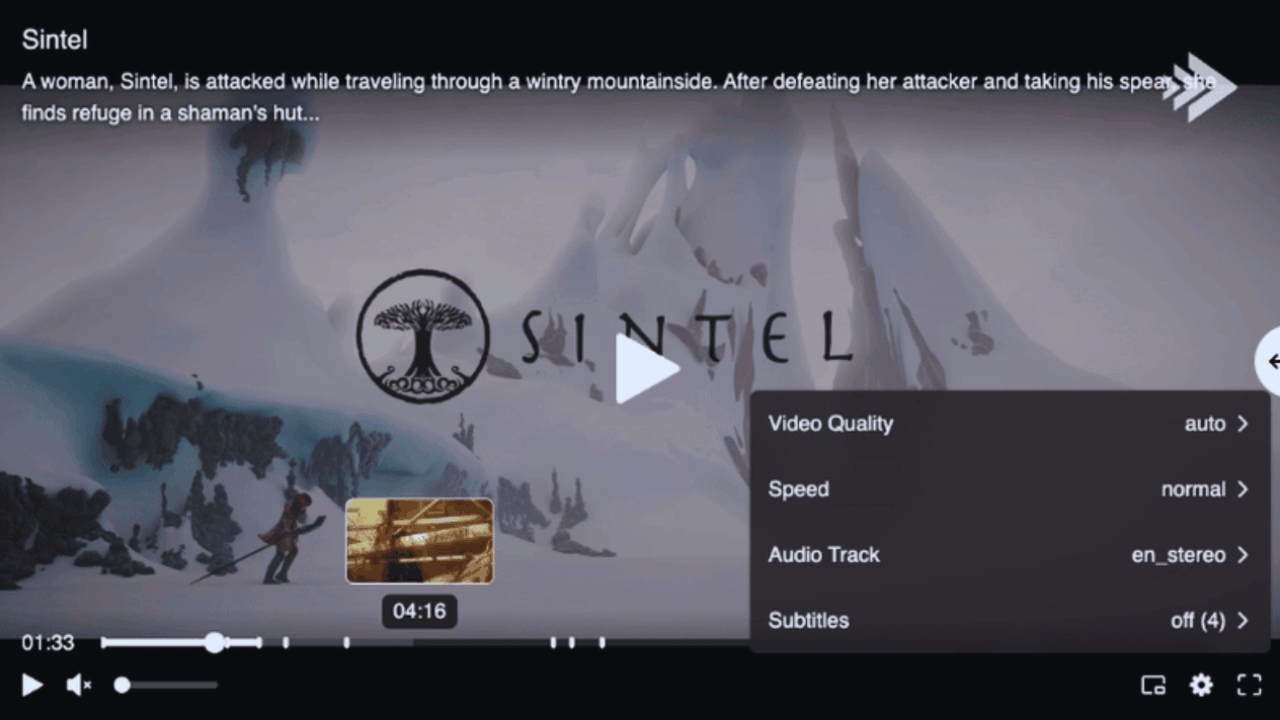
UI v4 introduces a redesigned interface for Bitmovin’s Player, bringing a cleaner and more modern visual structure to the playback experience. Controls have been reorganized to create a clearer visual hierarchy, making it easier for viewers to recognize and access playback actions while watching video. Spacing and alignment across the player have also been refined, helping reduce visual clutter around the content itself.
Several visual improvements contribute to the updated interface:
- A redesigned layout that improves the visual hierarchy of playback controls
- Updated icons and styling across the player UI
- Improved spacing and alignment of interface elements
- Cleaner overlays that appear more naturally during playback interactions
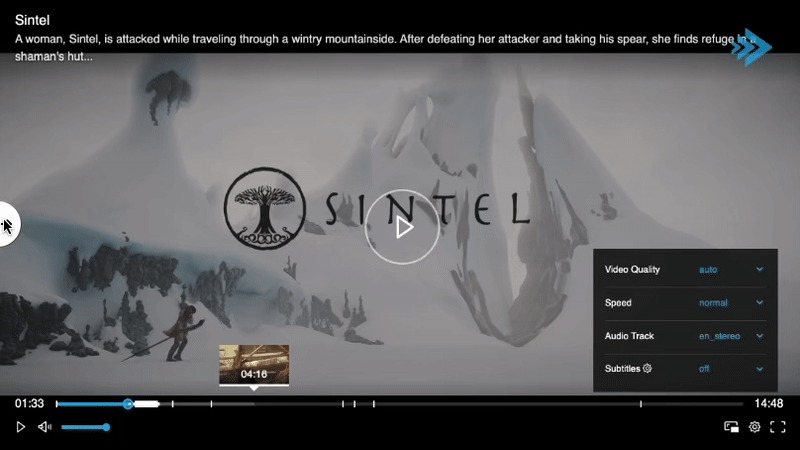
Gif showcases V3 to V4 comparison, that can be seen in the Bitmovin Player demo page
The comparison highlights how the updated layout simplifies the player interface while maintaining familiar navigation patterns for viewers. Essential playback controls remain easy to locate, while the overall design places greater emphasis on the video itself. These refinements help create a more polished viewing experience across devices without changing how viewers expect the player to behave.
What changed in UI v4
Beyond the visual redesign, UI v4 also introduces updates that improve how the player interface is structured and maintained. These changes provide a stronger foundation for teams that customize Bitmovin’s Player while keeping the default interface easy to deploy. By refining the underlying UI framework, the update helps simplify long term maintenance and future player enhancements. Additional details about the update are available in the UI v4 “What’s new” documentation
Key improvements include:
- A new default player UI designed for modern streaming environments
- Improved organization of UI components within the player framework
- A more maintainable UI structure for long term player updates
- A cleaner foundation for customizing controls and overlays
- Better consistency across player implementations using the default UI
These updates help development teams extend and adapt Bitmovin’s Player interface more easily as their streaming platforms evolve. The updated structure reduces the effort required to maintain customized player experiences while still supporting a consistent interface across devices.
How to Migrate to UI v4
For teams currently using earlier versions of the player UI, UI v4 includes a migration path designed to make upgrading straightforward. Developers using the default interface can often transition with minimal changes, while teams that have customized their player UI can follow the official UI v3 to UI v4 migration guide to update their implementations.
The migration documentation explains the key updates introduced in the new UI framework and outlines the adjustments developers may need to make when moving from previous UI versions. By providing clear upgrade guidance, the transition to UI v4 allows teams to adopt the redesigned interface while maintaining the playback behaviors and branding they already rely on.
Try UI v4 for yourself
UI v4 brings a refreshed interface and improved interaction patterns to Bitmovin’s Player, helping streaming platforms deliver a cleaner and more intuitive playback experience across devices. Developers can explore the updated interface in the UI v4 player demo and review the available documentation to learn more about the new UI framework and migration process.
If you would like to see how Bitmovin’s Player can support your streaming workflows or discuss implementing the updated UI in your platform, you can contact the Bitmovin team to learn more.
FAQs
What is Bitmovin’s Player UI v4?
UI v4 is the latest default interface for Bitmovin’s Player. It introduces a redesigned visual layout with updated icons, improved control hierarchy, and better spacing — delivering a more polished playback experience across browsers, mobile, and connected TVs.
What changed visually in UI v4 compared to UI v3?
The control bar has been reorganized for clearer visual hierarchy, icons and styling have been updated throughout, spacing and alignment are more consistent, and overlays appear more naturally during playback interactions. The overall design places greater emphasis on the video content itself.
Does UI v4 change how Bitmovin’s Player works?
No. UI v4 is a UI-layer update. Core playback behaviors, SDK APIs, and streaming capabilities remain unchanged. Viewers familiar with the previous interface will still find controls where they expect them.
Where can I try Bitmovin’s Player UI v4?
The updated interface is available to explore in Bitmovin’s Player UI v4 demo at demo.bitmovin.com. Full documentation is available in the Bitmovin developer portal under the UI v4 “What’s New” section.