
TL;DR
- The past 18 months have been about fine-tuning Bitmovin’s Player
- Startup is up to 45% faster on tested Samsung and LG smart TVs, depending on the OS version
- The Player bundle was cut by 24%, and even with new features in place it’s still 19% smaller than before, which means less bandwidth and faster load times
- Six memory leaks are fixed, keeping long-running sessions stable
- Ad preloading, including opt-in segment preloading, means fewer black screens and smoother transitions from content to ads
Improving Player performance
Bitmovin’s Web team has been working on four areas over 2025 and 2026: startup performance, bundle size, memory and ad transitions. Much of that work was aimed at smart TVs, where hardware is constrained, devices stay in living rooms for years and small inefficiencies in a web player quickly show up as slow starts, freezes and rough ad breaks. If you follow our releases closely, each change might look small. Cumulatively, however, the impact is significant, and it reaches older platforms as well as current ones.
In this blog we’ll go into why Player performance matters for your viewers and your team, then walk through each of the four areas: what changed, what we measured and what’s coming next. Along the way, we’ll point out what you can do on your side, from upgrading and enabling ad segment preloading to measuring the difference with Bitmovin’s Observability solution.
Why it’s important
Viewer experience affects business outcomes. Poor quality of experience (QoE) makes viewers more likely to abandon playback or switch to another service, and video startup time (VST) is one of the first things they experience. Take a leading Middle Eastern broadcaster: with some integration help from us, they achieved these median startup times in production with Bitmovin’s Player:
| Platform | Median VST (in seconds) |
| Browsers (desktop and mobile) | 1 |
| Samsung Tizen (all OS versions) | 2.5 |
| LG webOS (all OS versions) | 3.2 |
| Hisense VIDAA | 1.5 |
| PlayStation 5 | 1 |
For the viewer
Your viewers don’t read release notes. They notice how long startup takes, whether your app is still responsive after two hours and how an ad break feels. For a smart TV viewer, these are the moments that matter. Our work means:
- Up to 45% faster cold starts on the Samsung and LG devices we’ve tested.
- Six memory leaks fixed, for more stable long-running sessions.
- Older devices benefit too, down to Tizen 3 and webOS 3.
- Cleaner ad breaks with less buffering, thanks to preloading.
For the development team
Troubleshooting a smart TV app is rarely a single bug fix. More often, it’s device-specific workarounds or support tickets that never trace back to a known issue. Because many of these improvements are built into the Player, upgrading to the latest version takes some of that work off your plate. What this means for you:
- You’ll fight fewer fires. With better baseline performance on older devices and our leak fixes, you’ll have fewer workarounds to maintain and one less source of crashes.
- It’s a lighter dependency. Today’s Player is 19% smaller than older versions, and we now track bundle size on every release.
- You’re protecting engagement. Less friction at startup and ad breaks can help preserve watch time and completion rates.
VST on smart TVs
A web player on a TV has little room to maneuver at startup. Most lower-end TVs have a processor that is often considerably slower than that of a mid-range phone, and on an older model you may be dealing with a browser engine that can be several years behind current desktop browsers. Before the first frame is even shown, your app has to download and run the app, set up the media pipeline, fetch the manifest and buffer the initial video segments.
We invested nearly 700 engineering hours in reducing VST over 2025 and 2026, targeting Samsung (Tizen) and LG (webOS) platforms. We didn’t target Hisense specifically, as there’s a lot of variance in its devices and OS versions, though much of the work should benefit Hisense too.
We reduced cold start time for Bitmovin’s Player by up to 45%. Of the 13 platform versions we tested, nine improved by 24% or more. Tizen 2, webOS 3 and webOS 5 improved by 11 to 19%, and webOS 4 by only 1%, as the chart below shows.
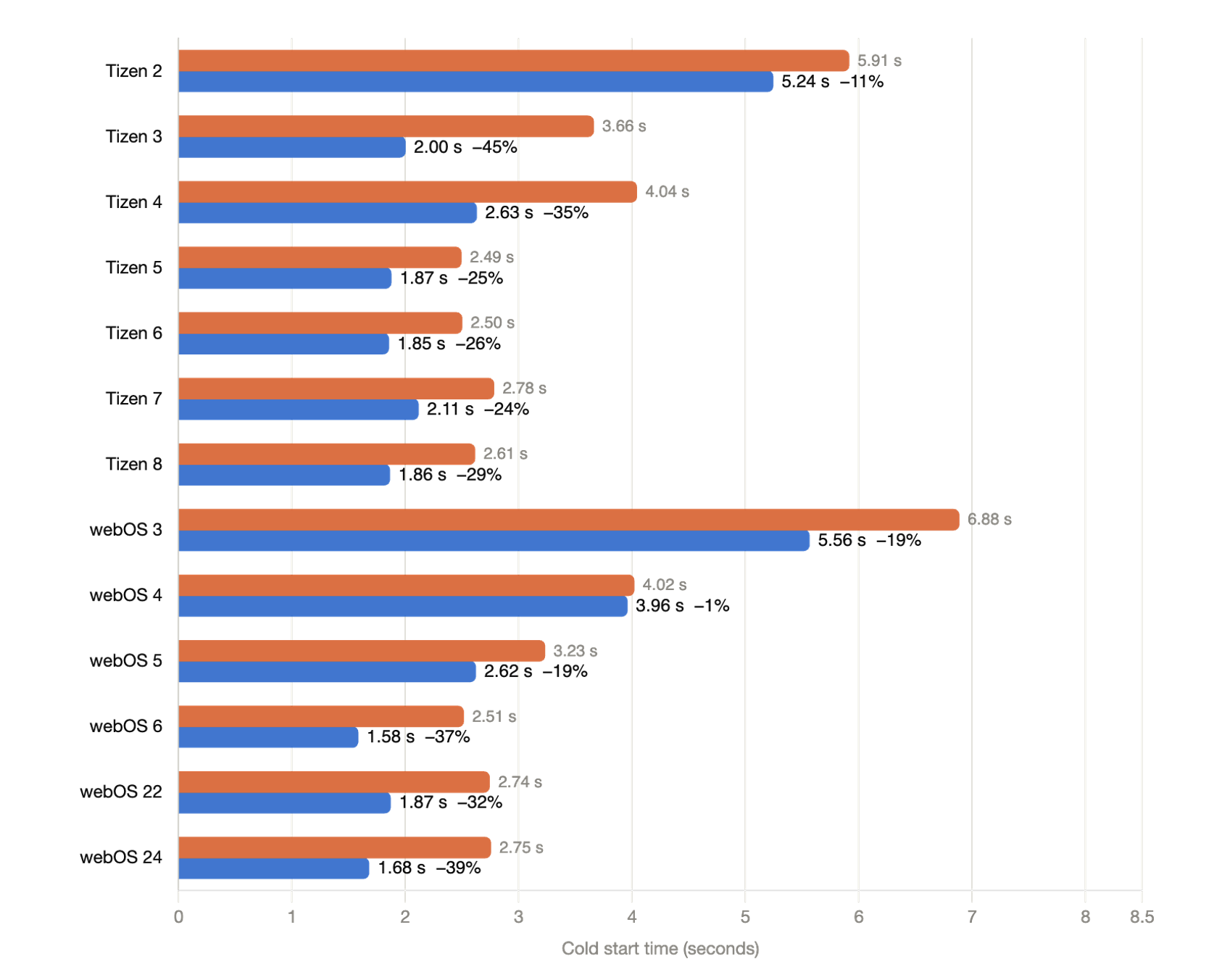
Cold start time per platform version: before (orange) and after (blue) our optimizations.
The same work also improved source switching times.
Reducing the Player bundle
Bundle size was another big lever for startup, since it depends on how much code has to load before the Player can run.
Between versions 8.232.0 and 8.233.0 of Bitmovin’s Player, we switched from obfuscation to minification and cut the full Player download by 24%, as the chart below shows. Obfuscation makes code harder to read through techniques such as indirection, encoded strings and renamed identifiers. Those techniques can add bytes and make it harder for JavaScript engines to optimize the code. Minification removes comments and whitespace and shortens identifiers, keeping the code compact without that additional overhead.
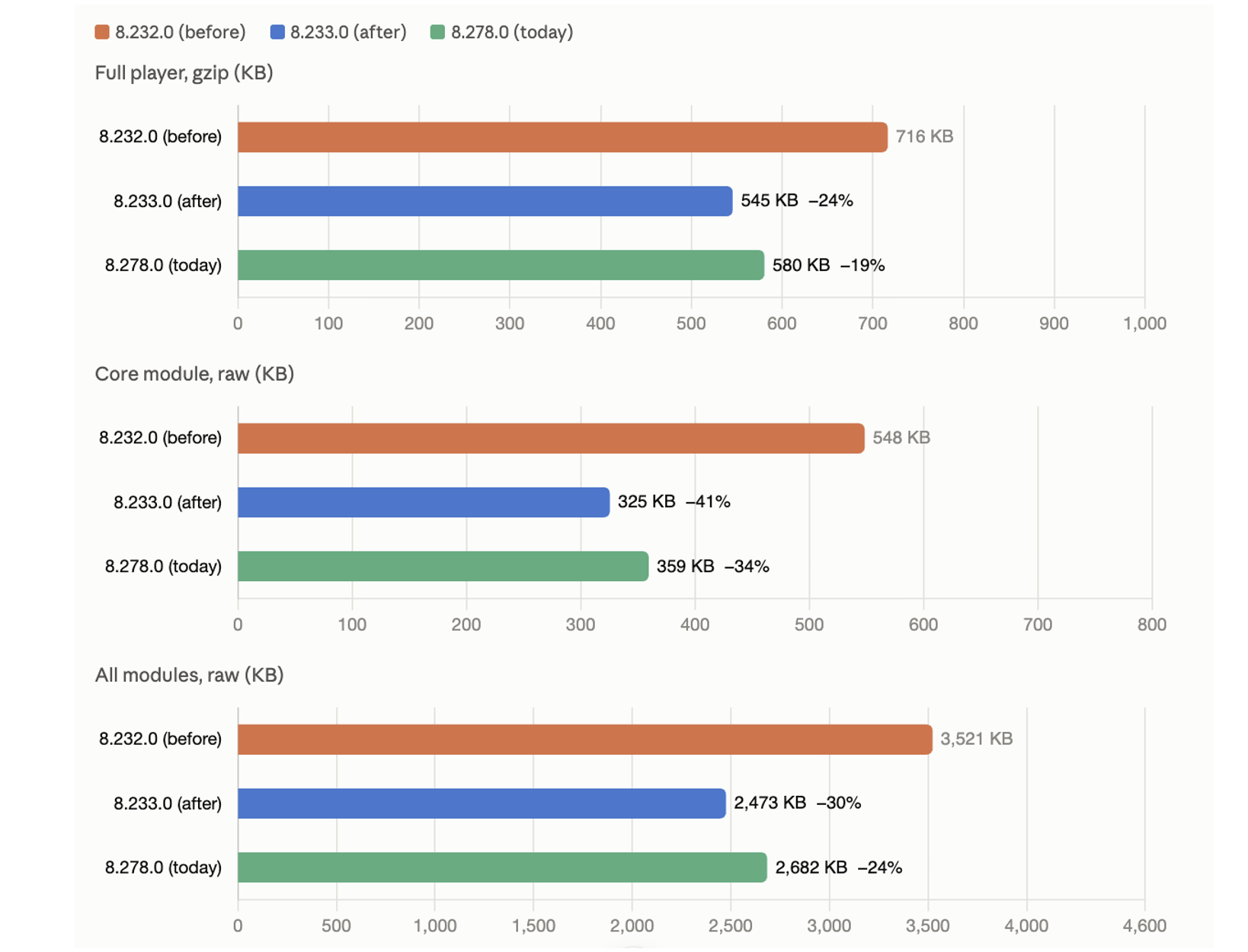
The core module came down by 41%. This is the part that has to load before playback, so these savings matter most for startup time. All sizes come from the bitmovin-player npm packages. The full Player figure is gzipped (level 9), and the core and module figures are raw.
Why bundle size is important
A lighter bundle means a faster download. This is important on congested or lower-speed networks, and it can slightly reduce CDN costs. It also helps on-device performance. On lower-powered platforms like smart TVs, set-top boxes and Vega OS devices, the browser has to parse and compile the JavaScript before anything can play, so a lighter core module means less strain on the CPU and a smoother start.
While we’ve added about 6% to the bundle since then with new features, we now track size on every release to make sure any growth is accounted for.
Fixing memory leaks
Fast startup only matters if the experience remains stable over a long session. We fixed six memory leaks in the Player over this time, typically objects that weren’t being released after an ad transition or a call to destroy().
A few leaked megabytes may have little impact in a desktop environment. On a smart TV, however, the Player and app UI share a much more limited memory budget. If the garbage collector can’t release objects the player no longer needs, these leaks can build up over source switches and ad breaks, slowing the app down and increasing the risk that the platform eventually closes it. By fixing them, we’ve made long-running sessions on STBs and smart TVs more stable, with less chance of the main JavaScript thread pausing or the app crashing.
On your end, you can help by calling destroy() when a viewer leaves the playback screen, so the memory is actually released.
Smooth ad transitions
Viewers of ad-supported services are quick to notice a bad transition, so we’ve invested over 400 engineering hours in using preloading to make them smoother.
Without preloading, the Player only starts requesting the ad manifest and first segments when the break begins, so the viewer waits while the ad downloads and buffers. With preloading, the Player can fetch the manifest, or the ASSET-LIST for HLS Interstitials, while the content is still playing.
With a few player tweaks, you can also turn on ad segment preloading, which buffers the first ad segments before the break, and SourceBuffer reuse. SourceBuffer reuse means the Player can keep its existing media buffers instead of tearing them down and starting from scratch at every ad boundary, a process that’s prone to black frames and delays. The result is smoother transitions with fewer black screens, which matters for both QoE and ad impressions.
Looking ahead
These releases aren’t the end of the work. We have roadmap items for each of these areas:
- Startup time: we’ll be adding newer Hisense devices to our test automation to look for more VST improvements.
- Bundle size: build setting tweaks should get us another 1.5 to 2% drop in the gzipped Player.
- Memory: we’ll be looking for remaining memory leaks in long-running sessions with frequent zapping.
- Ad transitions: we plan to preload even earlier and bring ad segment preloading to the Bitmovin Advertising Module (BAM).
Conclusion
None of this was achieved with a silver bullet. The stability and startup times you see are the result of many releases of incremental work. If you’re still on an older version of Bitmovin’s Player, upgrading is the quickest route to these benefits, and you can then turn on ad segment preloading with a few settings. If you use Bitmovin’s Observability solution, compare VST before and after the upgrade to see the impact on your viewers.