
New HEVC matches your current quality at 15.5% lower bitrate. AV1 needs 30.6% fewer bits than the current HEVC encoder at the same speed.
| −15.5% bitrate, new HEVC vs current, Per-Title | −30.6% bitrate, AV1 vs current HEVC, Per-Title | 25% less cloud compute time, new HEVC | 0.38× vs 0.37× AV1 and current HEVC at the same speed |
Encoder Version 3 is the next major release of the technology behind Bitmovin’s VOD and Live Encoders. It brings new HEVC and AV1 codecs tuned for Per-Title Encoding, an MCP server that lets your AI agent read your encodings, Media over QUIC for sub-second live, and AV1 priced in line with HEVC. Below are the numbers behind each claim, how they were measured and where they narrow, so you can decide whether to run the same test on your own content.
What Encoder Version 3 is
Encoder Version 3 starts from one premise: the best picture the internet can deliver should not cost more to produce, store, or ship. Each change in this release tests that premise, and come with numbers you can verify.
Four things changed:
- The codecs. New HEVC and AV1 encoders, both tuned for Per-Title Encoding. The new HEVC matches the quality of your current encoder at 15.5% lower bitrate. While AV1 needs 30.6% fewer bits than the current HEVC encoder at the same quality and the same encoding speed.
- The formats. HDR10 on VP9 and AV1, Real-Time VMAF scoring for H.264, HEVC, and AV1, with Dolby Vision Profiles 10.0 and 10.1 on AV1 coming soon.
- The interface. A Bitmovin MCP server, so Claude, ChatGPT, Cursor, and GitHub Copilot can read your encodings in plain language.
- The price list. AV1 cost multipliers cut 50% for managed cloud customers, bringing AV1 in line with HEVC, and HDR10 and HLG priced the same as SDR.
Bitrate is the number that reaches your budget. Encoding is a one-time cost per title; delivery recurs on every hour watched, for as long as the title stays in the catalog. Every bit a viewer does not download is CDN egress you do not pay for, which is why the comparisons below are stated in bits rather than in price per encoded minute.
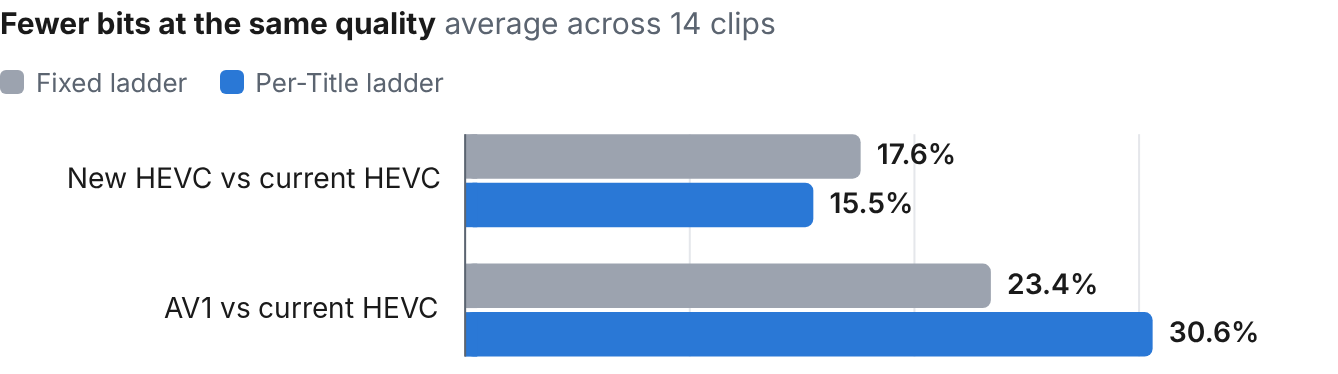
Chart 1. Fewer bits at the same quality, average across 14 clips. A fixed ladder isolates the codec; a Per-Title ladder adds what each codec can do with its own rungs, which widens the AV1 gap and narrows the HEVC one slightly. The AV1 comparison is against the current HEVC encoder.
HEVC: the same picture, for 15.5% fewer bits
The new HEVC codec matches the current encoder’s quality at 15.5% lower bitrate with Per-Title Encoding, or 17.6% lower on a static ladder. Both figures are averages across four content categories, weighted equally.
On the static ladder, the savings ran from 25.9% on the deepest clip to 10.4% on the shallowest. With Per-Title, cinematic content gained most (24.0%), sports 13.3% and TV 8.6%. The gain is smallest on high-frame-rate television: the five clips at 50 or 60 fps averaged 11.1% with Per-Title, against 16.3% for the nine clips at 24 to 30 fps, and one 60 fps TV clip saved 1.5%.
Held at the same bitrate, the new codec scores higher on every rung of every clip: 3.0 VMAF points on average with Per-Title and 3.9 on a static ladder. On Sports mix 1 at 30 fps, the gain is 6.9 VMAF points at 240p and 360p, 5.3 at 480p and 3.7 at 720p. The gain is largest at the bottom of the ladder and narrows as the picture gets good enough that there is less left to win. Those bottom rungs are the ones a viewer on a poor connection actually receives, which is where a few VMAF points are noticed.

Chart 2. VMAF gained at the same bitrate, by rung: new HEVC vs current HEVC, Sports mix 1 at 30 fps. The gain is largest on the bottom rungs.
In Bitmovin’s launch testing, the new encoder also used 25% less cloud compute time on average. Note that the quality benchmark ran the new codec on a slower preset, so measure speed on your own jobs at the actual quality level that you target. The bitrate saving lands on origin storage, CDN egress, and every viewer connection; the compute savings lands on the encode bill.
One worked example: For the Sports mix 1 clip, 30 fps, at VMAF 85, the upgraded HEVC codec needs just 1.43 Mbps while the current codec needs another 300 kbps. That’s 17% fewer bits for the same quality. At the same 360p rung and within 1 kbps of the same bitrate, the new codec scores 64.2 against 57.3. The DASHBOARD lets you drag a divider across both encodes while they play, with the VMAF of each frame tracked underneath.
AV1: 30.6% fewer bits than current HEVC, at the same encode speed
At equal quality, AV1 needs 23.4% fewer bits than the current HEVC encoder on a fixed ladder and 30.6% fewer when each codec builds its own Per-Title ladder. A fixed ladder runs both codecs on the same rungs, which isolates the encoder: that is the 23.4% advantage. Letting each codec choose its own resolution and rate per rung measures what that freedom is worth, and AV1 has more room to exploit than HEVC does: that is the 30.6%.
NOTE: A fixed ladder understates AV1. If you run Per-Title in production and compare codecs on a shared ladder, you will underestimate what AV1 saves you.
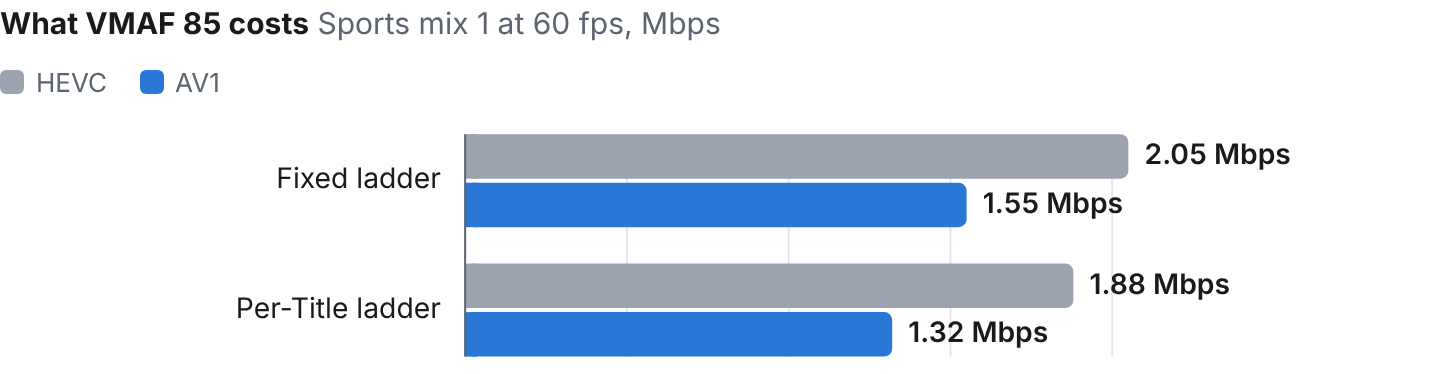
Chart 3. What VMAF 85 costs: Sports mix 1 at 60 fps, Mbps. 24% apart on the shared ladder, 30% apart when each codec builds its own. HEVC is the current encoder.
Biggest where bandwidth hurts most. Sports leads at 26% on a fixed ladder and 35% with Per-Title. High-motion, high-bitrate content dominates a delivery bill, so the savings are weighted toward the hours that cost the most.
Every clip benefits, not just the average. AV1 needed fewer bits on all 14 clips. On the fixed ladder, the saving ranged from 16% on the easiest clip to 29% on the hardest.
No turnaround penalty. Both encoders averaged the same speed: 0.38× real-time for AV1 against 0.37× for the current HEVC encoder. The usual trade for a newer codec is time; here the added savings costs nothing in encoding time.
On Sports mix 1 at 60 fps, at the same 720p rung and the same bitrate to within 7 kbps, AV1 scores 88.0 against 83.5 for the current HEVC encoder, and the gap widens exactly where the action does.
One more comparison, on public content so anyone can repeat it. Meridian, from the University of Waterloo’s public IVC 4K Video Quality Database, reaches VMAF 88 at 731 kbps with AV1, 1.29 Mbps with HEVC and 1.96 Mbps with AVC. That’s a 43% and 63% bitrate reduction. AV1 holds full 1080p on every rung of that ladder, while AVC drops to 432p at the bottom to stay watchable.
Across 19 of the 20 Waterloo IVC 4K clips, AV1 averages 36.1% below HEVC and 58.0% below AVC. That gap is wider than the 14-clip fixed-ladder figure because each codec built its own Per-Title ladder, so the measurement includes what that freedom is worth.
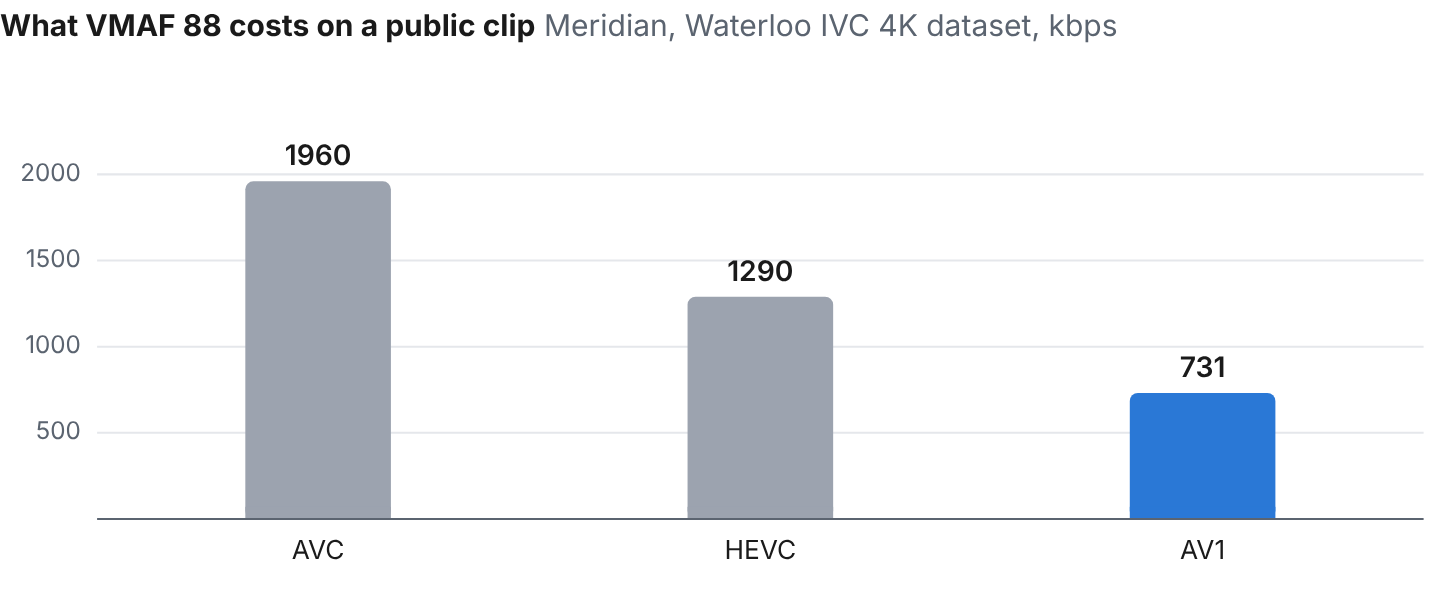
Chart 4. What VMAF 88 costs on a public clip: Meridian, Waterloo IVC 4K dataset, kbps. AV1 needs 43% fewer bits than HEVC and 63% fewer than AVC on this clip.
Against a public cloud encoder
The comparison most teams actually run is not new codec against old codec; it is Bitmovin against the encoder bundled with their cloud. So the same testing included a leading public cloud encoder, run on its default settings with no tuning on either side. The comparison is an automated ABR ladder against Bitmovin Per-Title, and the same fixed six-rung ladder for both.
On HEVC, the cloud encoder’s automated ABR ladder needed 58.5% more bitrate to match the quality of the new HEVC with Per-Title Encoding. The ladder is most of that gap: on Sports mix 1 at 30 fps, at 1,330 against 1,326 kbps, Per-Title served 900p where the automated ladder served 432p, and scored 9.6 VMAF higher.
On the same fixed ladder, which isolates the codec, the cloud encoder needed 19.8% more. Our current encoder and the cloud encoder are level on that fixed ladder (1.4% apart), so the 19.8% is what the new codec adds. On AV1, the cloud encoder offers no content-aware ladder; against its fixed ladder, Bitmovin’s Per-Title AV1 needed a median 27.1% less bitrate at the same quality, and ran at 0.38× real-time against 0.24×.

Chart 5. Extra bitrate a public cloud encoder needs to match the new HEVC at the same quality on the same 14 clips. The Per-Title bar compares each encoder’s own ladder; the fixed-ladder bar isolates the codec.
Encoding is often the smaller line on a streaming bill while egress is the larger. A bitrate gap at equal quality never appears on the encoding invoice. It appears on the delivery bill, on every hour watched, for as long as the asset is live. How much of it you pay depends on which rungs your viewers watch. In a June 2026 study by Jan Ozer, a 10% gap at equal quality became a 14% gap in average delivered bitrate under a top-heavy viewing profile.
Jan Ozer’s study commissioned by Bitmovin of H.264 per-title encoding, across 15 clips in five content categories, found that a comparable public cloud encoder would need to raise its bitrate 10% to match Bitmovin’s quality, while its ladders stored 44% more bytes than an optimal ladder, against 10% for Bitmovin.
Under a top-heavy distribution profile, Bitmovin delivered near-identical quality at 14% lower average bitrate. The same study is candid about the trade, the cloud encoder was faster and cheaper to encode, at $13.27 per hour of content against $53.82 for Bitmovin’s High Quality preset. At $0.02 per GB delivered, Bitmovin’s lower bitrate pays back that difference once each hour of content reaches about 7,900 viewing hours on a top-heavy profile. Encoder Version 3 carries the bitrate lead into HEVC and AV1.
How it was measured
Bitmovin measured fourteen 1080p clips spanning animation, cinematic, sports and TV content (one, three, six and four clips), encoded on a fixed six-rung ladder and separately with Per-Title, and scored with VMAF v1.0.16. In the HEVC comparison, both codecs used the same Lanczos downscale on sub-1080p rungs. Weighting the 14 clips equally gives 17.9% and 14.5% for HEVC. Every point on the report charts is a real rendition from that codec’s ladder and the BD-rate figures integrate those points over the bitrate range both encoders share.
Two comparison methods appear throughout, and they answer different questions. Running both codecs on the same fixed ladder isolates the encoder. Letting each codec build its own Per-Title ladder measures the codec plus what Per-Title can do with it. That is what the Per-Title figures measure, and why they are larger for AV1. The fixed-ladder figure tells you what the codec is worth and the Per-Title figure shows what you will see in production.
DASHBOARD reports are interactive. Simply select ‘HEVC v2’ or ‘AV1 Encoding’ from the demo tiles, pick a clip, and drag the divider across the same rung of both encodes while they play. The VMAF score of each frame is shown underneath the video. You may hover at any point on the rate-distortion curve to see which resolution Per-Title chose for it. The Meridian comparison uses public content from the Waterloo IVC 4K database, making it easy to reproduce independently.
VOD specific updates in Version 3
HDR on more codecs. Version 3 adds HDR10 support for VP9 and AV1. HDR10 is 10-bit BT.2020 with the PQ transfer function, with the metadata carried through to the output; HLG works the same way. Dolby Vision on AV1, Profiles 10.0 and 10.1, is coming next (Late Fall 2026).
Quality you can read during encoding. Real-Time VMAF scoring is available for H.264, HEVC and AV1.
Per-Title and three-pass, as before, now on the new codecs. Per-Title builds the ladder from the title, not the catalog. Per-Title saved 8.0% over a static ladder for the new HEVC v2 and 23.1% for AV1. Three-pass encoding saves up to 10% on BD-rate by moving bits from segments that don’t need them to those that do, so the hardest segments get the most quality at the same total bitrate. Per-Title needs one line of configuration and no tuning; the ladder comes from the content complexity not the content category.
The price list. AV1 cost multipliers are cut 50% for managed cloud customers, which brings AV1 in line with HEVC. HDR10 and HLG encoding are priced the same as SDR. So the choice of AV1 or HDR now turns on bits and picture quality, not on the encoding rate card.
An encoder your AI agents can read
With Version 3, “why did last night’s encode fail?” becomes something you ask, not debug.
Through the Bitmovin MCP server, coding agents and assistants such as Claude, ChatGPT, Cursor and GitHub Copilot get read-only, plain-language access to your own VOD and Live encodings. They can list and filter recent jobs, inspect encoding parameters, explain failures and summarize activity, with no custom API integration code on your side.
The agent can tell you which jobs failed overnight and why, and what the ladder on a given encode looked like. The MCP server joins the Bitmovin Skill (bitmovin.com/skill) and the Bitmovin CLI as the ways an agent learns Bitmovin’s APIs. Setup instructions are here.
Live: less than a second behind reality with MOQ
For live, Version 3 introduces streaming using Media over QUIC (MOQ), a transport built for sub-second latency at scale. For live sports, auctions and interactive formats, the viewer catches up with the live action. Version 3 features reach general availability for VOD production deployments first, with additional features, performance and quality improvements for Live following closely. The live numbers will get their own post once there is a published method behind them, the way the VOD numbers have here.
Try it on your own content
“We were first to show viable cloud-based encoding with AV1,” says Stefan Lederer, co-CEO and co-founder of Bitmovin. Version 3 is in the same position a generation later with expanded features, performance, and operating modes.
Every number in this post comes from a test with a stated method, and every one of them was produced by an encoder you can run. Per-Title AV1 needs one line of configuration and no tuning. We encourage you to encode a title you know well, ideally your hardest 60p sports and your darkest drama, compare it against what you ship today, and read the VMAF back off the job. What you see will make the effort worth your time.
- Existing Bitmovin customers can request Version 3 beta access now at contact us, ahead of general availability for VOD production deployments this fall.
- Teams new to Bitmovin can create an account with 2,000 free minutes a month, or contact us for a walkthrough of the results using their own content.