In Bitmovin’s testing, the AV1 codec in Bitmovin’s VOD Encoder Version 3 reached the same VMAF as Bitmovin’s first generation HEVC codec with 23% less bitrate on a static ladder. It needed 27% less bitrate (median across 14 clips) than AWS Elemental MediaConvert’s AV1 codec.
AV1 promises big bitrate savings, but how much it actually saves depends on the encoder, the content and what you compare it with. We tested the AV1 codec in Bitmovin’s VOD Encoder against two reference points, Bitmovin’s first generation HEVC codec and AV1 in AWS Elemental MediaConvert, on 14 clips across sports, TV, cinematic and animation content. A single headline number can never tell the full story of a video quality comparison, so this post shows which codecs were compared, how quality was measured and what kind of content was tested.
In this blog, we’ll go into the methodology, the data and what the results mean for your own encoding choices. You can also validate the results yourself in Bitmovin’s VOD Encoder Version 3, with general availability planned for later this fall.
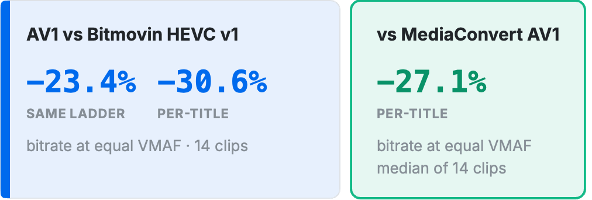
Figure 1. Each figure is the bitrate Bitmovin AV1 needs at the same VMAF score, relative to the named anchor. Negative numbers therefore represent bitrate savings achieved using Bitmovin AV1.
Here’s how each comparison was set up:
- Bitmovin’s HEVC codec (v1), the HEVC codec in production today, on 14 clips spanning sports, TV, cinematic and animation content. The first test compared both codecs configured for the same static ABR ladder; the second let the encoder generate a unique ABR ladder for each clip and codec combination.
- AWS Elemental MediaConvert AV1, on 14 clips in the same four content types. Because MediaConvert’s Automated ABR feature doesn’t support AV1, MediaConvert used a static ladder throughout. Bitmovin was tested on that same static ladder and with its own per-title ladder, to separate the codec’s contribution from the ladder’s.
All results are for file-based VOD encoding. Live encoding test cases were not included in this round of testing.
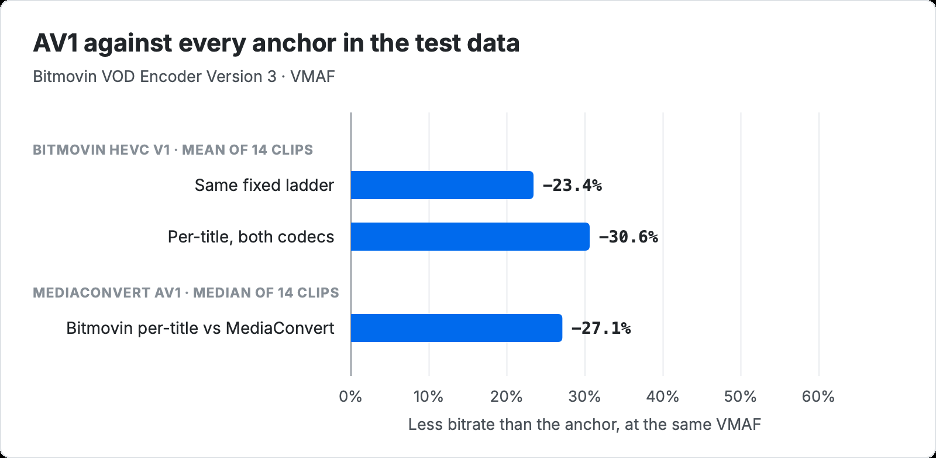
Figure 2. Bitrate AV1 saves at equal VMAF, by anchor. (Negative numbers represent bitrate savings using Bitmovin AV1.)
The spread in Figure 2 matters more than any single bar. The smallest saving, 23.4%, comes from the comparison with Bitmovin’s first generation HEVC codec on a shared static ladder, and the largest, 30.6%, from letting per-title encoding build each codec’s own ladder.
Bitmovin AV1 vs HEVC: 23% fewer bits for equal quality
In the first set of tests comparing Bitmovin’s AV1 to Bitmovin’s HEVC v1, the same 14 clips were encoded to the same six bitrates and resolutions, yielding BD-rate curves that effectively highlighted the raw differences in compression efficiency between the two codecs. AV1 needed 23.4% less bitrate on average than HEVC v1 for the same VMAF score. It won on all 14 clips, by margins from 16% to 29% depending on the clip.
Sports produced the widest gap, at 26% on the static ladder. Figure 3 shows one sports clip at a VMAF target of 85 where HEVC required 2.05 Mbps and AV1 needed just 1.55 Mbps.
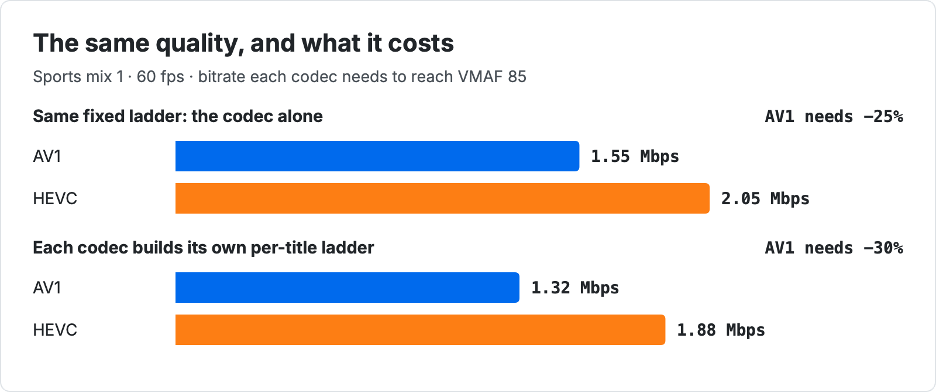
Figure 3. Bitrate each codec needs to reach VMAF 85 on Sports mix 1 (60 fps), first on a shared static ladder, then with each codec’s own per-title ladder.
The second test replaced the static ABR ladder with a dynamic one. Here Bitmovin’s per-title algorithm chose for each codec’s ABR ladder those resolutions and bitrates that delivered the best quality with the least bits spent. Using content-adaptive ABR ladder generation allowed average bitrate savings of AV1 to grow to 30.6% and even reach 35% with some content types. A static ladder holds AV1 back, because it has to use the same resolution as HEVC at each bitrate even when its efficiency would support a higher one, and per-title encoding removes that limit. Both HEVC and AV1 gain from per-title encoding, but with AV1 the advantage is compounded by its superior compression efficiency.
Bitmovin AV1 vs HEVC: higher VMAF on every matched rung
The BD-rate method summarizes whole curves. A matched-rung view, on the other hand, asks a simpler question: How does quality compare when you fix the resolution, frame rate and bitrate? We compared the 360p, 720p and 1080p rungs of the shared ladder on all 14 clips. AV1 scored higher in all 42 comparisons, by 0.5 to 10.0 VMAF points.
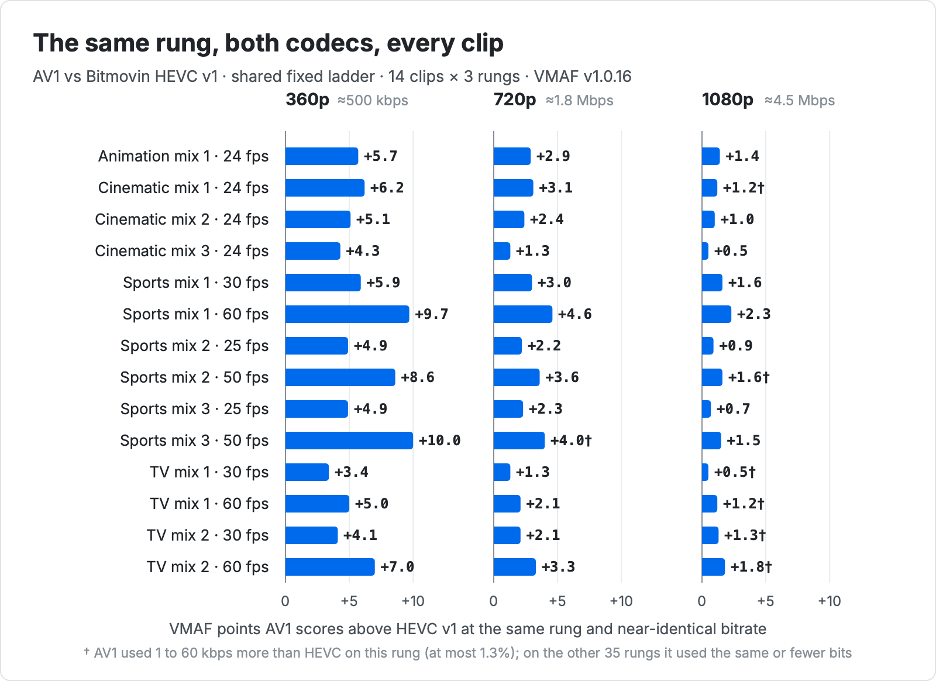
Figure 4. AV1 VMAF scores higher above HEVC v1 at three rungs of the shared static ladder, on each of the 14 clips. High motion Sports mix 3 at 50 fps is 10 points above HEVC.
The size of the gain depends on the rung. At 360p, around 500 kbps, AV1 scored 6.1 points higher on average while using 5.7% fewer bits. At 720p the average gain was 2.7 points, and at 1080p, where both codecs score in the 90s on most clips, it was 1.2 points. AV1 spent slightly more than HEVC on 7 of the 42 rungs, by 1 to 60 kbps and never more than 1.3%. Those rungs show gains of 0.5 to 4.0 points, in line with their neighbors.
Frame rate produced the clearest pattern in the set. Five sources appear in the set twice, once at 25 or 30 frames per second and once at 50 or 60 frames per second. In all five, the higher-frame-rate version gained more from AV1, at every rung: 15 of 15 pairs. At 360p the sports gains nearly doubled, from 4.9 to 10.0 points on Sports mix 3 and from 5.9 to 9.7 on Sports mix 1.
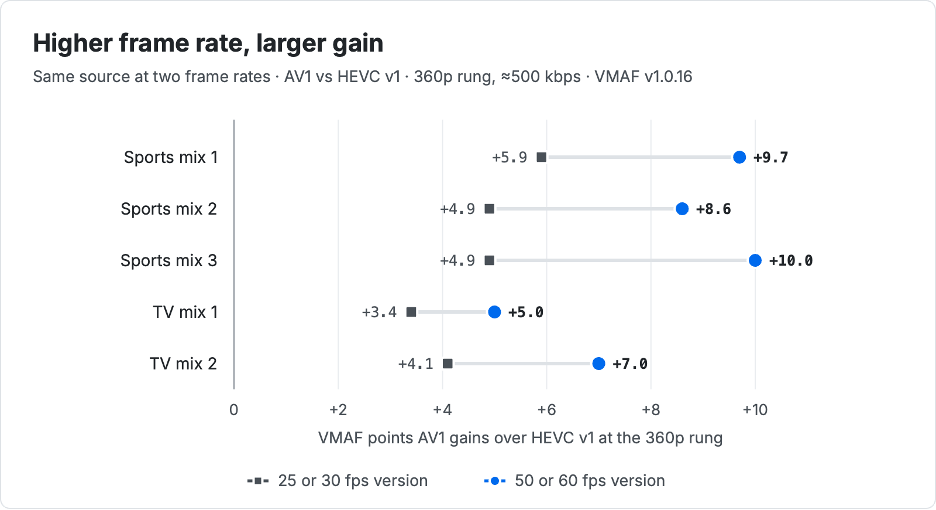
Figure 5. The same five sources at two frame rates. At the 360p rung, the 50 or 60 fps version gains more from AV1 in every case; the pattern also holds at 720p and 1080p.
One possible explanation is that AV1’s coding tools handle the smaller motion between frames in higher-frame-rate video more efficiently at a fixed bitrate. For a VOD catalog heavy in 50 and 60 frames per second sports, the low rungs are where AV1 pays back the most.
Bitmovin AV1 vs MediaConvert AV1: 27% fewer bits for equal quality
Choosing the AV1 codec is a good first step towards more efficient video delivery, but what about the choice of encoder product? To test that choice, we put our 14 test clips through AWS Elemental MediaConvert and its AV1 codec.
MediaConvert’s Automated ABR (i.e. per-title) encoding feature supports AVC/H.264 and HEVC/H.265, but not AV1. So for AV1 we encoded every clip with MediaConvert using a single static ladder, with each rung’s QVBR factor set to 9 and its bitrate cap set to the target bitrate. We then encoded the clips with Bitmovin AV1 to exactly match MediaConvert’s final bitrates in the static ladder. Finally, we encoded the clips to AV1 using Bitmovin’s per-title encoding, which produced a unique ABR ladder for each clip. This allowed us to determine how much of the quality differences came from the codec and how much from the ABR ladder.
Across the 14 clips, Bitmovin per-title needed a median 27.1% less bitrate than MediaConvert for the same VMAF score.
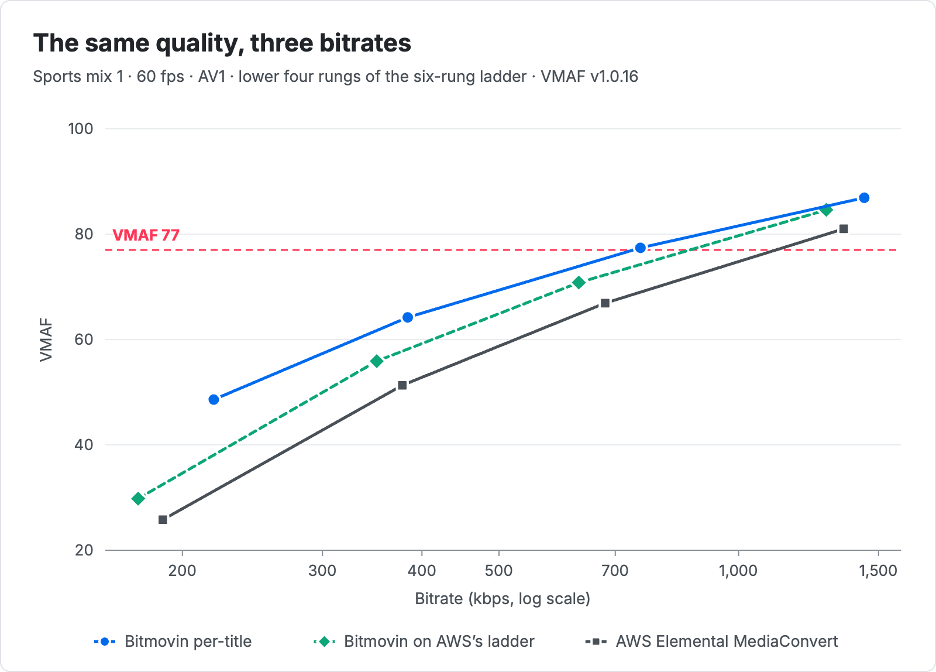
Figure 7. Rate-quality curves for Sports mix 1 (60 fps), AV1. The dashed green line is the control: Bitmovin’s encoder on MediaConvert’s own ladder.
At VMAF 77, MediaConvert needs 1,064 kbps and Bitmovin per-title needs 720 kbps, 32% less. The dashed control line sits between them: Bitmovin’s encoder needs fewer bits than MediaConvert even on MediaConvert’s own ladder, and per-title encoding moves the curve further left.
The balance of contributions between codec and ladder depends on the content (Figure 8). On sports and TV the two contribute roughly equal shares. On sports, the codec alone saves 16.9% and the ladder alone 18.6%. The two contributions compound by multiplying rather than adding: 0.831 × 0.814 = 0.676, yielding a 32.4% total saving. On cinematic and animation content the codec does most of the work.
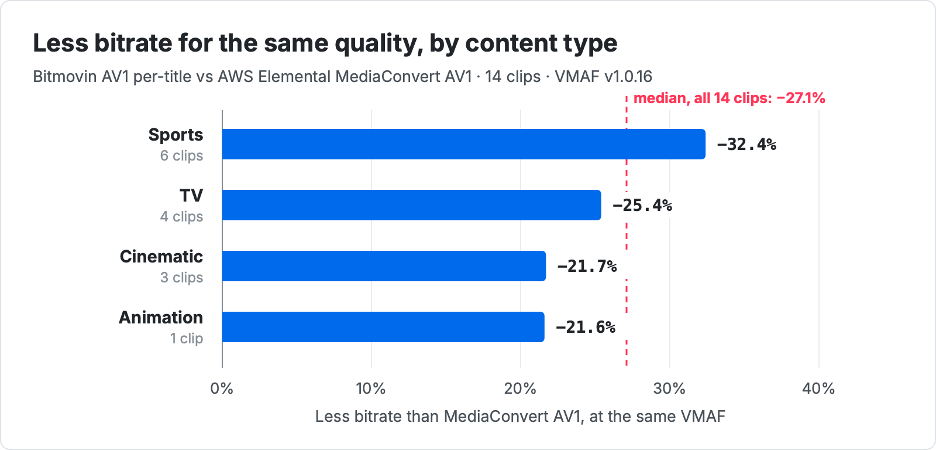
Figure 8. Bitrate Bitmovin AV1 per-title saves against MediaConvert AV1 at equal VMAF, by content type. The dashed line marks the median across all 14 clips. MediaConvert used a static ladder, since its Automated ABR feature doesn’t support AV1.
On the 60 frames per second sports clip, per-title AV1 served 900p at 1,437 kbps where MediaConvert served 720p at 1,353 kbps, and scored 5.7 VMAF points higher. This example highlights the advantage of content-adaptive, per-title AV1 encoding that is supported by Bitmovin’s VOD Encoder but not AWS Elemental MediaConvert.
The savings cost no encode time
In video encoding, efficiency gains often come at the expense of encoding speed. That was not the case with Bitmovin’s AV1. In Bitmovin’s encoder, AV1 averaged 0.382x real-time speed while HEVC v1 averaged 0.375x, so the 23% bitrate savings came with no loss in encoding speed. Against MediaConvert, Bitmovin’s AV1 encoder averaged 0.38x real-time speed while MediaConvert averaged 0.24x, so MediaConvert took roughly 58% longer to encode while needing more bitrate for the same quality.
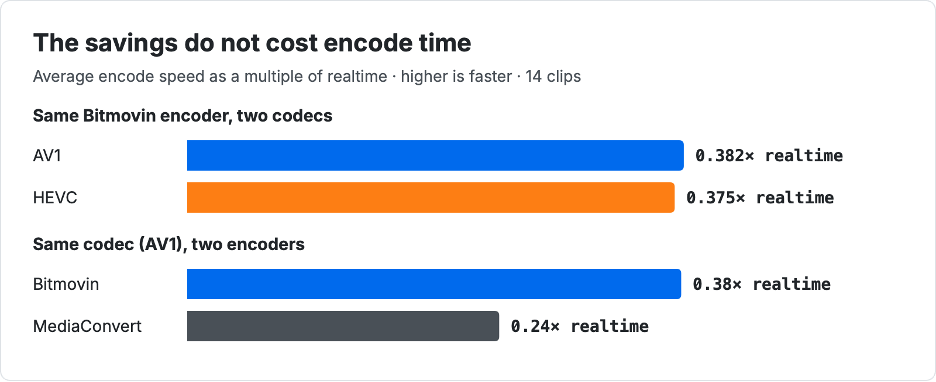
Figure 9. Average encode speed as a multiple of real time across 14 clips. Higher is faster.
A few qualifications apply to every figure above. The HEVC comparisons use Bitmovin’s first generation HEVC codec, the one in production today. The second generation HEVC codec arriving with Encoder Version 3 needs 17.5% less bitrate than the first generation to reach the same quality, so the gap between HEVC and AV1 is likely to be smaller against it. All comparisons use VMAF only, and we haven’t yet published PSNR or SSIM results for AV1.
The 14-clip set leans toward sports, with six clips, and includes a single animation clip, so treat the animation result as one data point. The MediaConvert comparison reports a median across clips, while the HEVC comparison reports a mean. MediaConvert used QVBR quality level 9, with each rung capped at its target bitrate and no further tuning, so a team that tunes its QVBR levels may see a smaller gap, and we’d welcome that comparison.
Stay tuned for more from Encoder Version 3
Bitmovin’s VOD Encoder keeps improving. To see how the latest HEVC update delivers the same picture quality with fewer bits, read our Encoder Version 3 overview.
Teams interested in benchmarking Bitmovin’s VOD Encoder against their existing workflows can start a free trial.