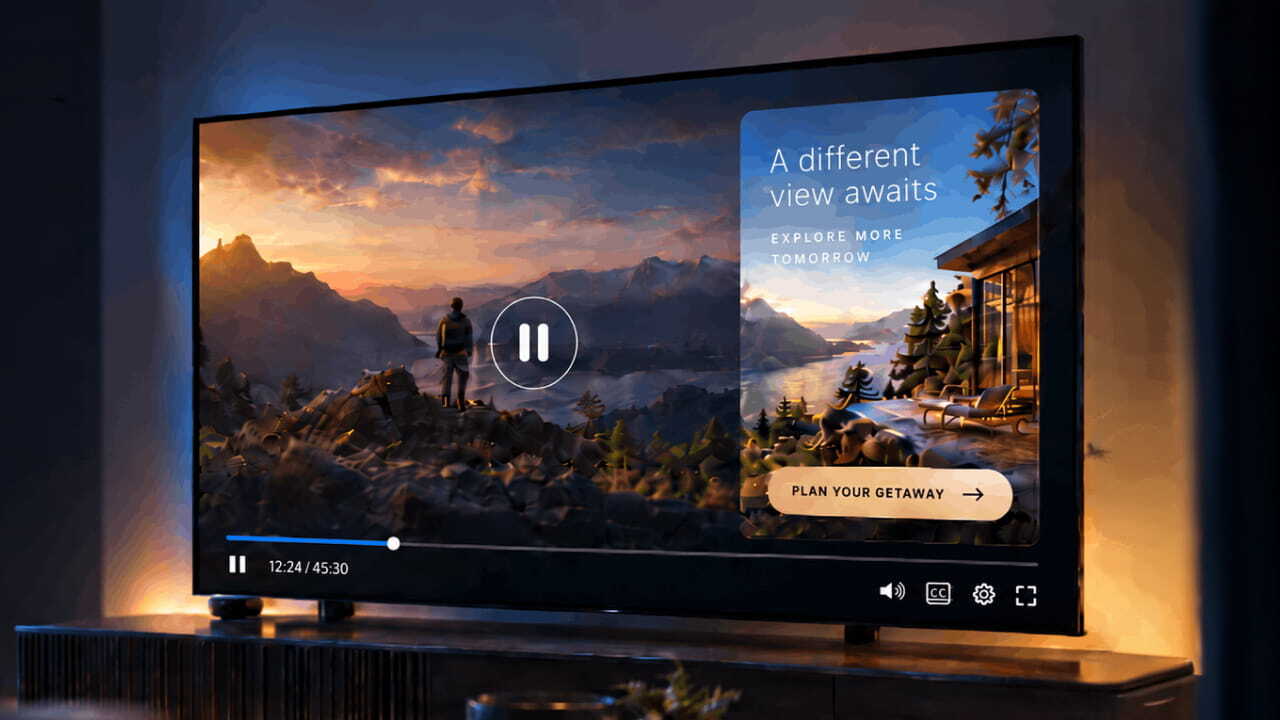

Bitmovin’s AI Scene Analysis now tags every scene and sends those signals to Google Ad Manager with each ad request.
What if every ad break carried signals about what was happening on screen, instead of relying only on title-level metadata? If you run ad revenue for a streaming service, you know your catalog better than anyone bidding on it: the classic car in the opening, the slow detective scene, the storm on the coast. Yet much of that can still reach the auction as one genre tag, set when the title was published, so an outdoor-gear brand or travel advertiser has less contextual information to determine whether that storm scene fits the campaign. Your audience data rarely travels with the request in a form buyers can use either. The result is that distinct moments within a title can reach the auction with the same broad metadata, limiting how precisely campaigns can be matched to context.
In this blog we’ll go into why title-level tags hold video inventory back, how AISA and Bitmovin’s Player turn every scene into signals Google Ad Manager can use, what that looks like when three viewers watch the same scene, and what it changes for your ad revenue and ad operations teams.
Why title-level tags hold your inventory back
Video content is often tagged at the title level, with a genre and a small set of keywords, and that tag follows every break for the entire runtime. A movie that opens on a classic car, moves into a detective’s office, and ends in a storm goes to market as one category from start to finish.
That matters for the buyers you want most. Many contextual and connected TV campaigns rely on genre and content signals to evaluate inventory, and they benefit from knowing what’s playing at the moment the ad runs. Publisher provided signals in Google Ad Manager provide a standardized way to pass eligible contextual and first-party audience signals across supported transaction types. What’s been missing is a way to create accurate scene-level signals across a whole library, in any language, without asking anyone to tag thousands of hours by hand.
How a scene becomes a signal buyers can bid on
AISA does the tagging for you. When a title goes through Bitmovin’s VOD Encoder, AISA watches and listens to it, splits it into scenes, and maps each one to IAB Content Taxonomy category IDs. It also assigns an ad-opportunity score at each scene boundary to identify more natural break points.
At each ad cue point, Bitmovin’s Player builds an ad request containing the current scene’s content signals, any eligible first-party audience segments, and a unique correlator, then sends it to Google Ad Manager through the IMA SDK. Your ad ops team works with these like any other publisher provided signal, and buyers can evaluate the impression using scene-level context rather than title-level metadata alone.
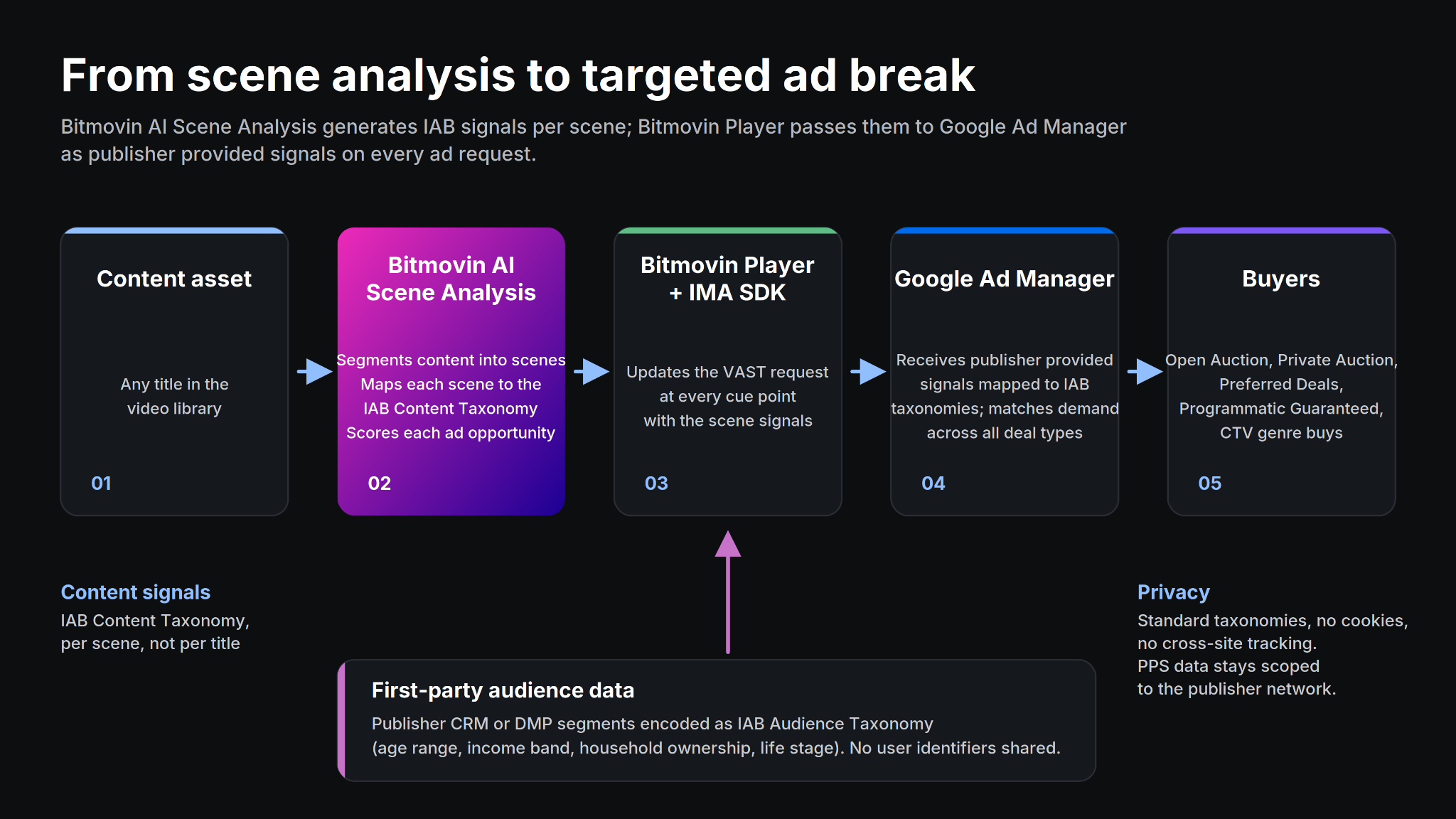
How scene and audience signals travel from an encoded title to the buyers bidding on it
Both use standardized IAB taxonomies, giving publishers and buyers a common language for content and audience signals across markets, on web, mobile, and connected TV.
One scene, three viewers, three different campaigns
To show what this looks like in practice, we built a reference implementation on a twelve-minute movie. AISA identified eight scenes, from the classic-car opening (Automotive › Car Culture and Travel › Travel Locations) to the detective’s office (Movies › Crime and Mystery Movies) to a storm on the coast (Events and Attractions › Outdoor Activities and News and Politics › Weather).
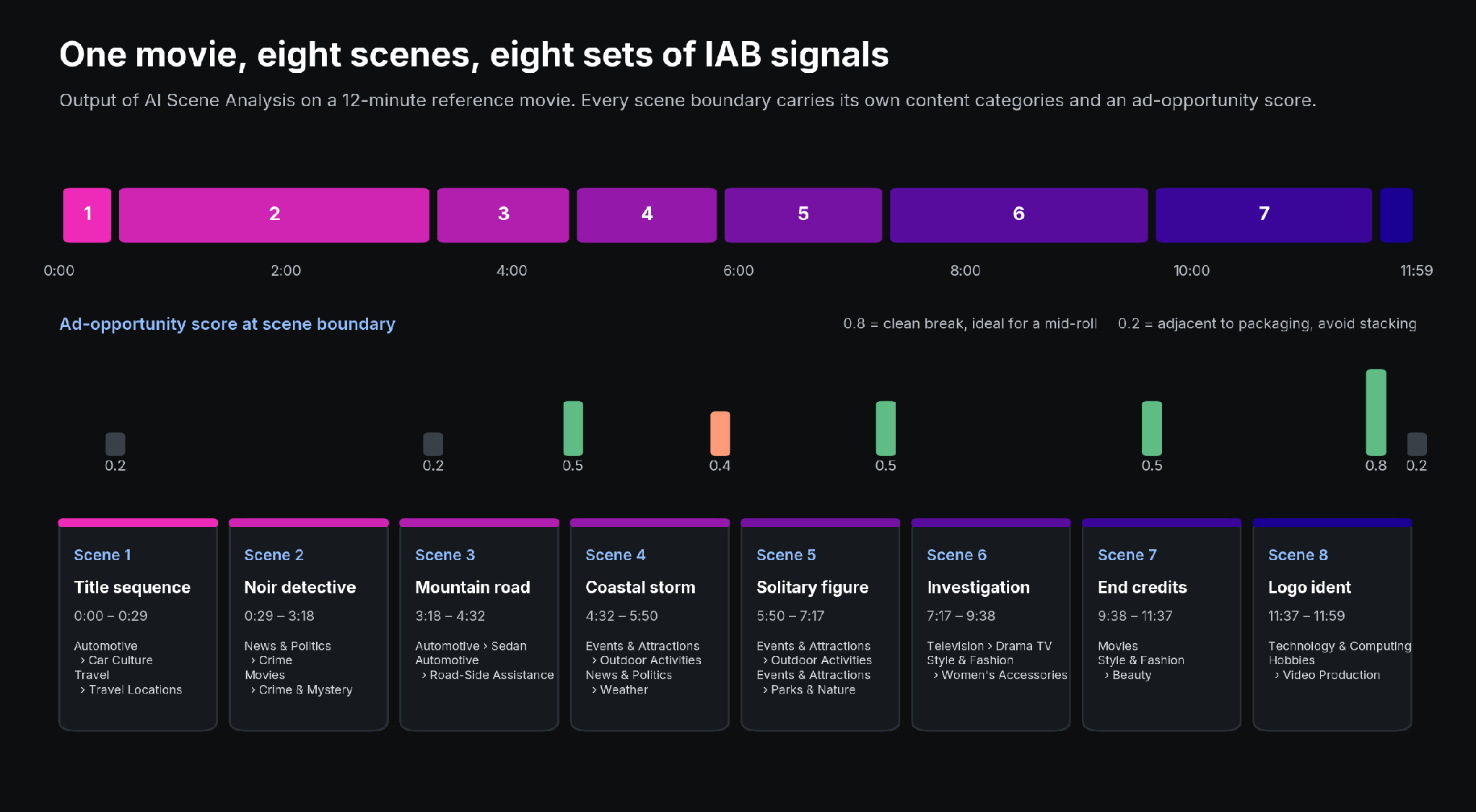
AI Scene Analysis output for the reference movie: eight scenes, their IAB categories, and the ad-opportunity score at each boundary
We then added three illustrative audience segments, encoded in IAB Audience Taxonomy by age range, income band, household ownership, and life stage. In production, these segments come from your own CRM or data platform and are mapped in Google Ad Manager under Inventory › Publisher provided signals, next to the content categories. During the storm scene, a young renter in the city could be matched to an outdoor-gear campaign. A mid-career homeowner with children watching the same moment could be matched to home and travel insurance, while a retired executive with high disposable income could be matched to a premium cruise.
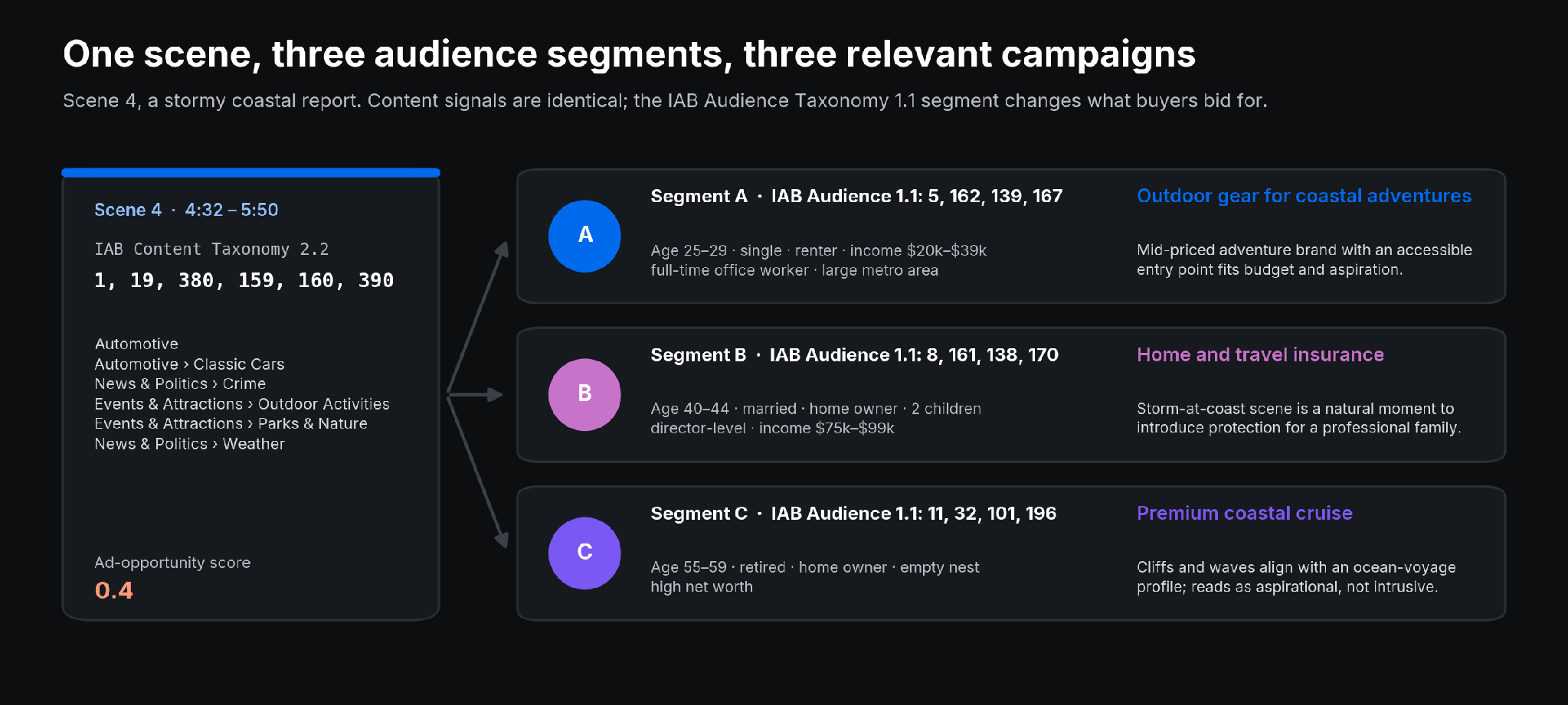
Same scene, same content signals, three audience segments and three relevant campaigns
What changes for ad monetization and ad operations
Your ad server, your buyers, and your consent framework stay in place, with PPS configured in Google Ad Manager. What changes is how much your inventory can say about itself, and buyers can now target combinations like Automotive + Aged 40–44 + Home owners. You’ll see the difference in a few places:
- Scene-level Automotive or Travel signals can be made available across Open Auction, Private Auction, Preferred Deals, and Programmatic Guaranteed, making inventory addressable to contextual demand that title-level metadata alone may not capture.
- Providing content signals on ad requests can make inventory eligible for campaigns that require those signals.
- Every scene of every title is tagged automatically, so a full library is covered without manual work.
- The ad-opportunity score can help teams identify more natural break points and avoid interrupting key moments in the content.
- Ad Manager reporting on publisher provided signals can help teams understand which categories and segments are attracting demand.
That reporting can give sales teams evidence about which categories and audience segments are attracting demand, and those insights can then inform how inventory is packaged for direct deals. PPS also lets you pass eligible first-party audience and contextual signals without sharing user identifiers with buyers.
Getting started
The integration is available now for Bitmovin customers using AI Scene Analysis and Player with the Google IMA SDK, with publisher provided signals enabled in Google Ad Manager. Bitmovin is a certified partner in the Google Ad Manager Technology Partner Program, so the IMA SDK integration has been through Google’s technical vetting and testing, and you’ll find Bitmovin in the certified partner listing in the Google Ad Manager Help Center.
A good first step is to pick one title your team knows well and look at the scenes AISA finds and the categories it assigns. To see the reference implementation live, book a session.
FAQs
What are publisher provided signals in Google Ad Manager?
Publisher provided signals (PPS) let publishers pass audience and contextual data to buyers in a standardized way across supported transaction types, without sharing user identifiers with buyers. PPS data stays scoped to the publisher’s own network.
How does AI Scene Analysis tag video content?
AISA analyzes each title’s video and audio, splits it into scenes, and maps each scene to IAB Content Taxonomy category IDs. It works in any language and also assigns an ad-opportunity score at each scene boundary to identify more natural break points.
Do publishers need to change their ad server or consent setup?
No. The integration works with the existing ad server, buyer relationships, and consent framework. PPS needs to be configured in Google Ad Manager, and the signals then reach it through the IMA SDK on each ad request.
Which transaction types can use scene-level signals?
Scene-level content signals can be used across Open Auction, Private Auction, Preferred Deals, and Programmatic Guaranteed.