

TL;DR
- Client-Side Smart Cropping enables dynamic reframing directly on iOS devices
- Bitmovin’s Player performs intelligent cropping on the client, allowing landscape video to be adaptively reframed for portrait consumption without re-encoding or creating additional video assets
- The Player identifies relevant visual areas and adjusts the visible viewport dynamically to maintain contextual integrity when displayed in vertical formats
- Because cropping occurs on-device, content providers do not need to generate separate vertical renditions, significantly reducing operational complexity and storage costs
Table of Contents
Repurposing landscape content into vertical formats such as 9:16 is now a common requirement for short‑form and mobile experiences. As more viewing shifts to phones held in portrait, teams want their existing video catalog to look good in a vertical frame without introducing a separate workflow just for it. A simple center crop often cuts off faces, presenters, or on‑screen graphics, and manually keyframing a crop window to follow the relevant region does not scale to live streams or large content libraries. Offline auto‑reframe tools and server‑side pipelines help with finished assets, but they require review, add processing latency, and become expensive at volume. They are also a poor fit for low‑latency live playback where decisions must be taken per frame.
To tackle this issue, we used an internal Bitmovin hackathon to build a fully client-side, real-time Smart Cropping prototype for the Bitmovin Player that keeps all computation on the device. The goal was to explore how far we can get with on‑device detection and tracking to drive a dynamic viewport without any additional cloud infrastructure. In this post we walk through how that prototype works, the constraints we set, and the trade-offs we ran into along the way.
Why We Tried Client-Side Smart Crop
We tried a client-side approach because we wanted to see if the player alone could make per-frame cropping decisions in real time, without adding new backend services or changing the existing delivery pipeline.
For the hackathon we set ourselves a fairly strict set of constraints.
- Run fully on-device, without external hints, metadata, or manual annotations
- Work “out of the box” for arbitrary content
- Be applicable to both live streams and video-on-demand (no-DRM)
Within those constraints we wanted to see whether a reasonably simple pipeline could keep the main point of interest inside a vertical crop most of the time.
Hackathon Prototype Overview
At a high level, we built the prototype as an iOS app on top of the Bitmovin Player SDK. The app tapped into decoded video frames using AVPlayerItemVideoOutput, ran per-frame object detection, tracked objects across frames, and predicted a crop region. We then applied that crop to the player view so that a vertical viewport followed the interesting content in real time.
System architecture at a glance
- Playback and frame access: Bitmovin’s Player iOS SDK → AVPlayerItemVideoOutput (playback + decoded frame access for the prototype)
- Detection: YOLOv11 via Core ML + Vision (fast and light weight on-device object detection, outputs bounding boxes and labels for detected objects per frame)
- Tracking: ByteTrack implemented in Swift (multi-object tracking that links detections across frames, including low-confidence matches, to keep tracks stable)
- Crop prediction: crop predictor (Predicts a portrait-view crop area based on tracked objects, their age, size, position, speed, etc.)
- Viewport control: crop controller (applied the crop region to the player view in real time)
One practical limitation of this approach is that it could not be used for DRM‑protected content, because raw decoded frames are not exposed in that scenario. For the hackathon prototype we focused on non‑DRM content.
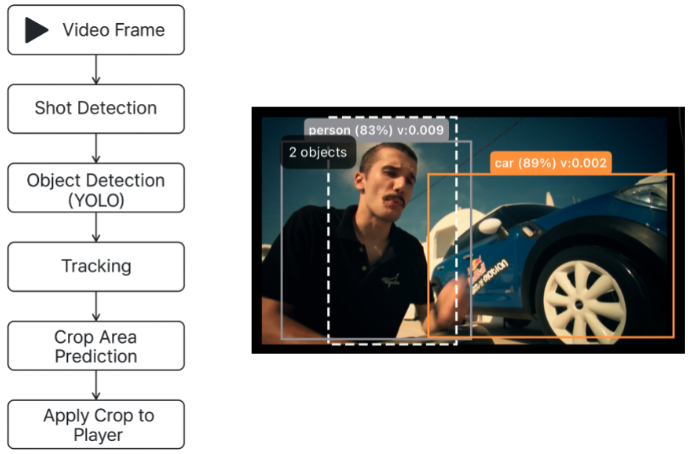
Overview of the pipeline for the Smart Cropping demo video
Deep Dive – Project Step Breakdown
Frame ingest
To start the pipeline, we accessed decoded frames exposed by the player via AVPlayerItemVideoOutput as we’ve mentioned above. We attached an output instance to the active source and drove it using a CADisplayLink, which fired once per screen refresh. On each tick, we queried the most recent CVPixelBuffer and converted it into a CIImage. The image was then resized to 640×640 pixels in BGRA format, which matched the input expectations of the YOLO11 models we used. This resized buffer was the entry point into the Smart Cropping pipeline.
Object Detection
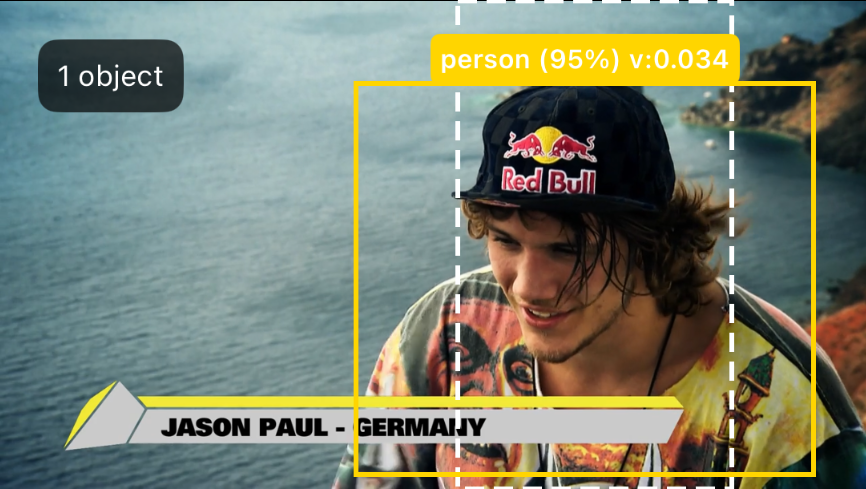
For object detection we used YOLO11 models converted to Core ML. The detection stage took the 640×640 input and produced a set of bounding boxes with class labels and confidence scores.
We kept the configuration deliberately permissive and allowed lower-confidence detections. This reduced missed objects and let the subsequent tracking stage recover from temporary noise, occlusions, or short-lived detection failures.
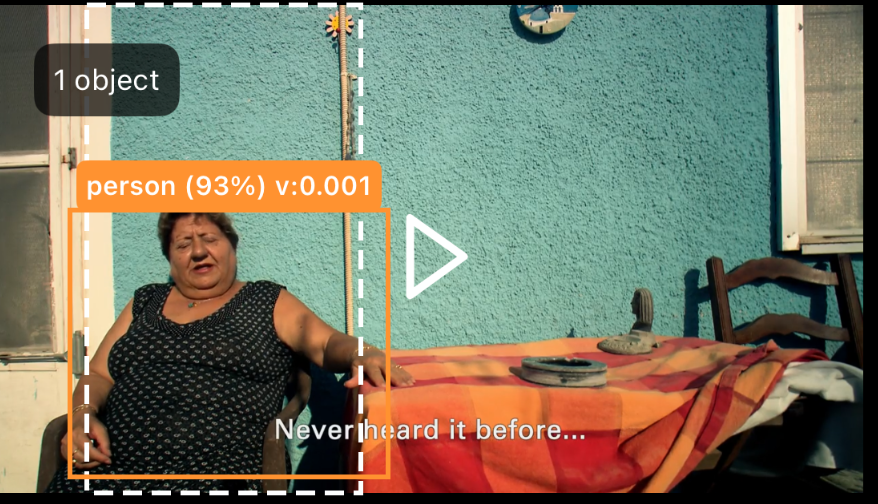
Screenshot from the Smart Cropping demo video showcasing object detection
Tracking
On top of the frame‑wise detections we ran a multi‑object tracker to obtain stable identities over time. This helped smooth over brief detection flicker or missed boxes from frame to frame. We experimented with Vision tracking requests first, but they were limited in the number of concurrent trackers per device and were not robust enough for dense scenes. We therefore implemented the ByteTrack algorithm in pure Swift, based on the open source description and reference implementation.
ByteTrack associated detections across frames using IoU‑based cost matrices and a two‑stage matching strategy for high‑ and low‑confidence detections. For each active track we kept a stable ID, an age counter, and an estimate of the object’s velocity in normalized coordinates. This tracking information was a key input to the crop prediction logic.
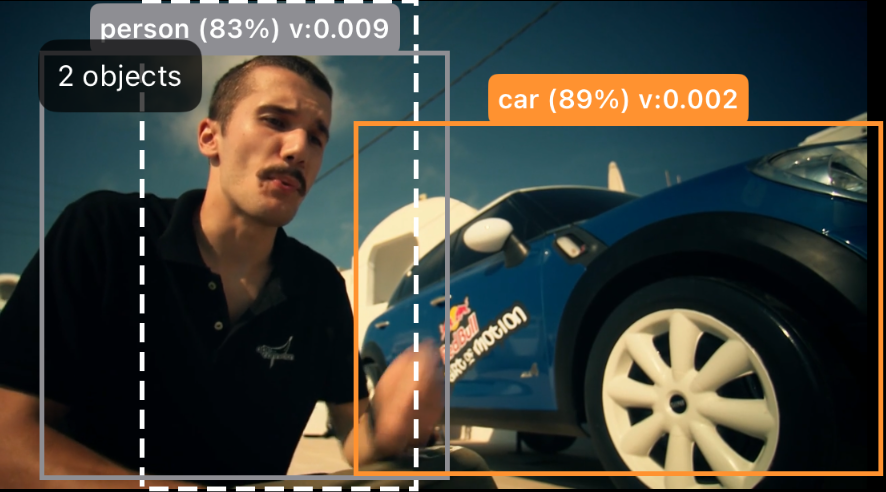
Screenshot from the Smart Cropping demo video showcasing multi-object tracking
Shot detection
Even with tracking, abrupt scene changes could confuse the tracker and lead to invalid crop decisions if old tracks persisted into a completely new shot. To mitigate this, we added a lightweight shot detector based on the Sum‑of‑Absolute‑Differences (SAD) between consecutive frames.
If the SAD exceeded a fixed threshold, we treated it as a shot change, reset all active tracks, and cleared the state of the motion filter. That way the new shot was cropped immediately based on fresh detections instead of slowly panning from a previous scene. The SAD‑based detector was intentionally simple and missed softer transitions such as fades, but it was sufficient for the purposes of the hackathon.
Crop Area Prediction
Deciding “what to look at” turned out to be the most interesting part of the project. The detector and tracker produce many boxes per frame, but the crop predictor needed a single horizontal region to center the vertical viewport. This was where most of the whiteboard markers were spent.
We tried two strategies:
- Point of interest (POI): select a single primary object and center the crop window on it.
- Centroid: compute a weighted center of gravity across all relevant objects and center the crop on that point.
Both strategies relied on an importance score for each tracked object. The score combines several factors:
- Label: people are weighted higher than generic objects.
- Velocity: faster moving objects get more weight than static ones.
- Size: larger boxes are preferred over very small ones.
- Age: tracks that have been stable for longer are trusted more than newly created ones.
- Centeredness: objects closer to the frame center get a slight boost.
The POI approach works well when there is a clearly dominant object in the scene. In practice, the centroid‑based strategy produced smoother and more robust crops for multi‑subject shots, because it naturally keeps multiple important objects inside the viewport instead of constantly jumping between them.
The scoring function encodes many assumptions and it is easy to construct counter‑examples. For instance, in a soccer broadcast the smallest object (the ball) is often the most important. A more principled approach would be to train a dedicated, small crop‑prediction model on labeled examples with “ideal” crop boxes per frame. Even so, the hand‑crafted scoring combined with centroid prediction produced reasonable results on our small and curated set of test videos.
Screenshot from the Smart Cropping demo video showcasing crop area detection
Smoothing & application
Raw crop positions tended to be jittery, especially when detections moved or appeared and disappeared. To make the viewport movement pleasant we applied an exponential moving average (EMA) filter to the crop rectangle. The filter blended the previous crop with the newly predicted one using a fixed smoothing factor (alpha). A lower alpha produced slower, smoother motion; a higher alpha tracked the underlying signal more closely.
On the UI side, a VerticalVideoCropController took the smoothed crop rectangle in normalized coordinates and translated it into Auto Layout constraints on the player view. The controller scales the 16:9 video to fill the vertical container height and panned it horizontally so that the requested crop region is visible. A SwiftUI overlay used the same transform to draw bounding boxes and the current crop region, which made it easy to visually debug the behavior.
Results & Observations
On recent Apple Silicon devices the prototype was able to run in real time and keep up with 60 fps playback when using the smaller YOLO11 variants. The detection stage dominated the processing cost; the tracker, shot detector, and smoothing filters were comparatively light. Choosing simple algorithms like ByteTrack and SAD was important to stay within the available per‑frame budget.
Qualitatively, we saw the following behavior:
- Centroid-based cropping produced calmer horizontal motion in scenes with multiple people, while the POI strategy felt more “snappy” for single-subject content such as talking heads.
- The shot detector effectively prevented long tails where the viewport continued to pan based on tracks from a previous scene.
Based on informal testing across a small set of hand‑picked clips, the crop region felt “reasonable” in roughly 70–80% of frames and was noticeably better than a static center crop. The remaining cases highlighted the limitations of the current heuristics and suggest where a learned crop predictor might add value.
Prototype Demo
Demo video
Below you can view a video of our demo where we showcase how the smart cropping worked. The video shows the predicted crop area as a rectangle with a white dashed outline. The detected objects, including their classification confidence and velocity are shown as rectangles with colored solid outlines..
Demo of the Smart Cropping Prototype
Next Steps
Looking forward, several technical areas stand out as the next steps for improving the Smart Cropping solution to get it production ready:
- Incorporate clustering (for example, DBSCAN) to detect groups of objects and reason about clusters instead of individual boxes, which might help in crowded scenes with many small objects.
- Train a compact crop‑prediction model on labeled data to replace the hand‑crafted scoring and centroid logic with a learned component that can capture more nuanced patterns.
- Systematically benchmark model sizes, frame rates, and device classes to find configurations that balance latency, accuracy, and energy consumption for real‑world deployments.
- Explore different device types outside of iOS and try and see if Smart Cropping could work across Web and Android
Conclusion
The hackathon prototype demonstrated that client-side smart cropping is technically feasible on current iOS devices. A relatively “small” amount of on‑device logic (object detection, tracking, simple shot detection, and a crop predictor) was sufficient in our tests to keep a vertical viewport aligned with salient content most of the time, without any additional server processing. There is still considerable work required before such a system could be part of a production workflow, but the experiment provided a concrete starting point for further engineering and evaluation and for a few days of hacking, that is a result we will gladly take!
FAQs
What is client-side smart cropping in video playback?
Client-side smart cropping is a playback feature that dynamically reframes video content directly on the user’s device. Instead of re-encoding the video into multiple aspect ratios, the player intelligently adjusts the visible region to fit different display formats, such as portrait mode on mobile devices.
How does Bitmovin’s Smart Cropping work on iOS?
Bitmovin’s Player analyzes the video content to identify regions of interest and dynamically adjusts the crop window during playback. This ensures key visual elements remain centered and visible when adapting landscape content to vertical screens.
Does smart cropping require additional encoding or separate video files?
No. One of the core advantages of this approach is that cropping happens entirely on the client side. Content providers can deliver a single encoded asset while the player dynamically adapts the presentation layer on iOS devices.
Is video quality affected by client-side cropping?
The original video stream remains unchanged. The player adjusts the visible viewport while maintaining playback performance and visual fidelity, ensuring a high-quality user experience.
Why implement smart cropping at the player level instead of server-side?
Player-level implementation eliminates the need for additional transcoding pipelines, avoids duplicative storage costs, and enables real-time adaptability based on device orientation and user context.