
Jan Ozer’s independent test found higher measured quality, lower bitrate and less storage with Bitmovin’s Per-Title H.264
TL;DR
- The High Quality preset in Bitmovin’s VOD Encoder ranked first across all five content categories on both VMAF and SSIM.
- The competitor cloud encoder needed 10.1% more bitrate on VMAF to match Bitmovin’s High Quality preset.
- Bitmovin’s encoding ladders required approximately 23% less total encoded storage than the competitor cloud encoder across the tested content.
- Independent testing found that Bitmovin’s Per-Title Encoding produced more efficient bitrate ladders and stronger measured quality than the competitor cloud encoder, while offering additional configuration flexibility.
Independent testing by video compression expert Jan Ozer found that Bitmovin’s VOD Encoder delivered higher measured video quality and greater bitrate efficiency than a VOD encoding SaaS product from an industry-leading public cloud provider in an H.264 Per-Title Encoding comparison. Across the tested content, Bitmovin’s High Quality preset ranked first in all five content categories on both VMAF and SSIM. The competitor cloud encoder required 10.1% more bitrate to achieve equivalent quality based on VMAF, while Bitmovin’s encoding ladders required approximately 23% less storage. These findings highlight how resolution selection, bitrate ladder construction and encoding configuration influence H.264 efficiency.
In this blog, we’ll examine how the independent benchmark was conducted, explore the technical decisions behind the results, and explain what engineers should consider when evaluating Per-Title Encoding performance across their own video content.
How the independent benchmark was conducted
Jan Ozer designed the test to compare the encoders the way a streaming service would use them, letting each one build its own per-title ladder for every clip. The setup covered:
- 15 clips across five content categories: cinematic, animation, sports, news and enterprise, and reality TV.
- Two presets in Bitmovin’s VOD Encoder: Standard (VOD_STANDARD), a two-pass preset, and High Quality (VOD_HIGH_QUALITY), a three-pass preset at higher-quality settings.
- A competitor cloud encoder’s automated per-title mode, tested with its default settings.
- Quality measured with VMAF and SSIM and compared as BD-rate, the difference in bitrate needed to reach the same quality across the whole ladder, plus the 1st percentile and the lowest-quality frame of each video.
- All 15 clips for the top-rung and storage results, and 13 for the overall quality comparison, for frame-rate reasons explained later in this article.
Ozer also created an optimized reference ladder using standard FFmpeg and x264, testing multiple resolutions at each bitrate and retaining the highest-quality result. Although this approach is too computationally intensive for typical production workflows, it establishes a useful reference for evaluating how closely each automated Per-Title implementation approaches an optimized bitrate ladder.
How ladder construction affects efficiency
The first question is which resolution each encoder chooses at each bitrate. At about 1 Mbps, the reference ladder sits at around 700p, and it keeps every title’s top rung at 1080p. Both Bitmovin presets followed it closely across the bitrate range, while the competitor cloud encoder chose lower resolutions, at around 400p near 1 Mbps. At the top of the ladder, the cloud encoder used 720p on seven of its 15 top rungs, while neither Bitmovin preset produced a top rung below 900p.
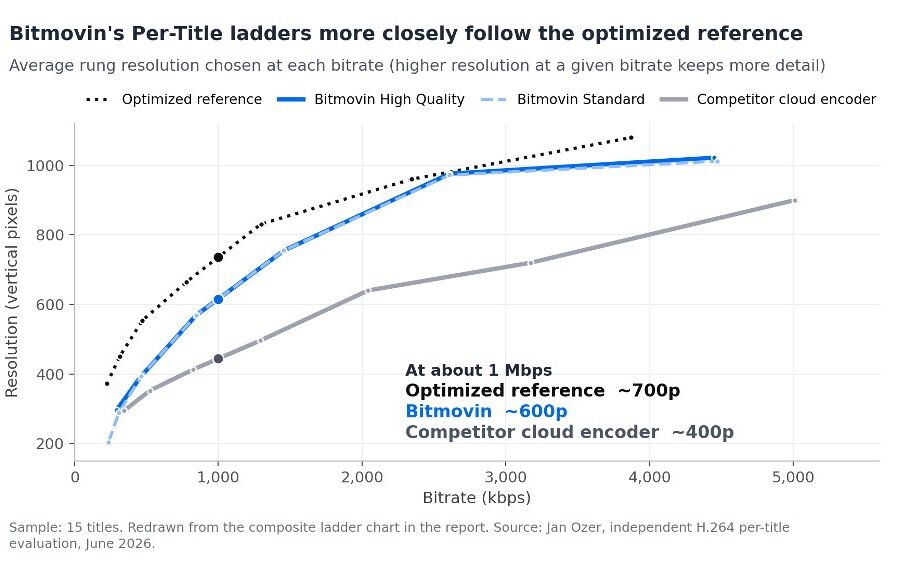
Figure 1. Ladder construction.
Selecting an unnecessarily low resolution can sacrifice spatial detail, even when the available bitrate supports a higher-resolution rendition. Ozer’s results demonstrate why resolution selection is an important part of evaluating Per-Title Encoding efficiency.
The number and spacing of rungs matter too. Apple’s HLS guidelines suggest spacing rungs 1.5 to 2 times apart in bitrate, and the encoders took very different approaches across the 15 titles:
- The competitor cloud encoder built 118 renditions in total, against 94 for each Bitmovin preset.
- 33 of the cloud encoder’s adjacent rung pairs were spaced less than 1.5 times apart, against one pair for each Bitmovin preset.
Closely spaced rungs can increase storage and encoding overhead without providing a proportionate quality benefit. The results suggest that an effective bitrate ladder is not necessarily the one with the most renditions, but one that provides useful quality coverage without unnecessary encoding and storage overhead. In this test, Bitmovin’s ladders came to about 23% less total encoded storage than the competitor cloud encoder’s.
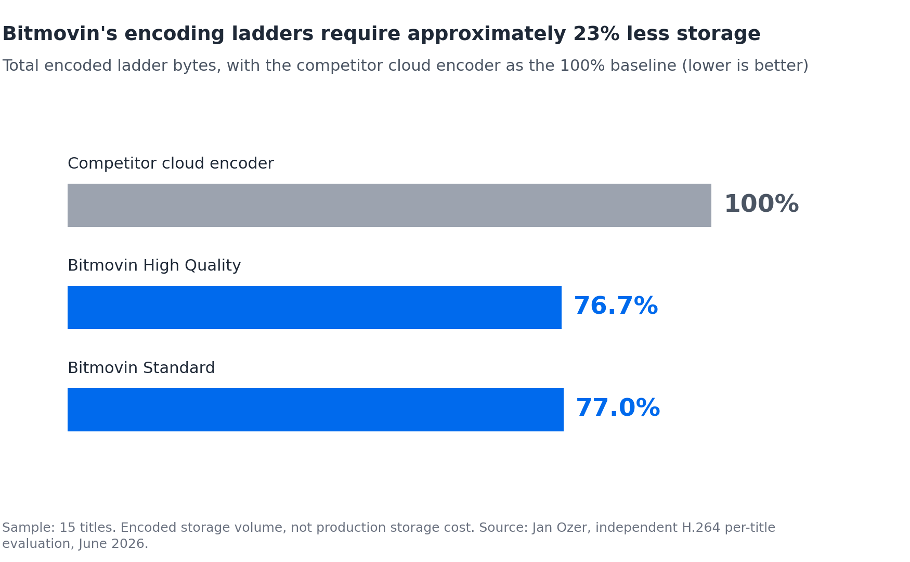
Figure 2. Encoded storage.
What the results reveal about video quality
Differences in ladder construction can influence video quality, but the important question is whether those choices translate into measurable improvements. Ozer evaluated this using VMAF and SSIM, comparing the bitrate required by each encoder to achieve equivalent measured quality. Across the 13 clips in the overall quality analysis, the competitor cloud encoder needed 10.1% more bitrate on VMAF and 19.8% more on SSIM to reach the same measured quality as Bitmovin’s High Quality preset. Bitmovin’s own Standard preset needed 18.8% and 16.9% more than High Quality, a comparison between the two Bitmovin presets rather than against the competitor cloud encoder.
These results demonstrate why comparing automated encoding solutions requires looking beyond the codec alone. The decisions made during ladder construction, combined with how individual renditions are encoded, can materially affect bitrate efficiency.
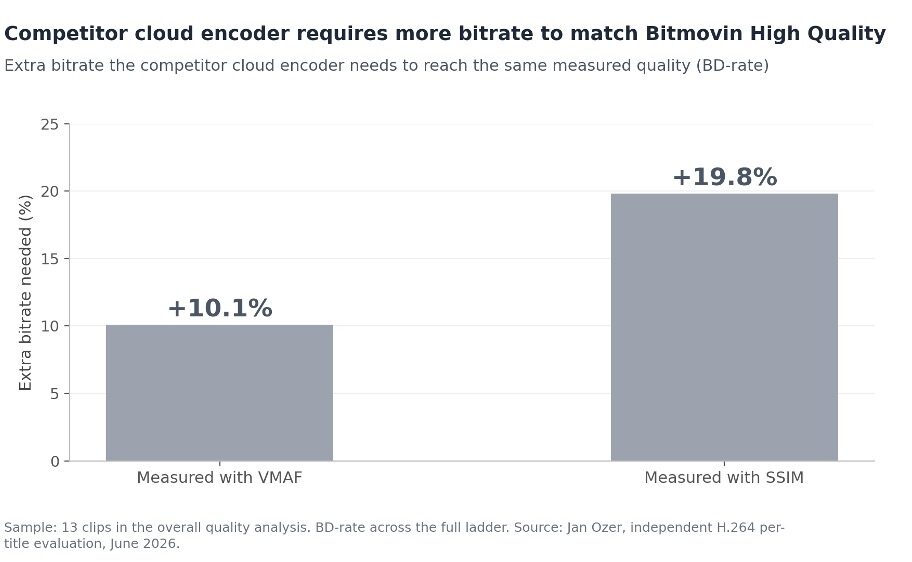
Figure 3. Bitrate efficiency (BD-rate).
Encoding performance across content types
The size of Bitmovin’s advantage varied considerably by content type. Figure 4 shows how much less bitrate Bitmovin’s High Quality preset needed than the competitor cloud encoder to reach the same measured quality in each category, using the Bitmovin-relative results from Ozer’s tables.
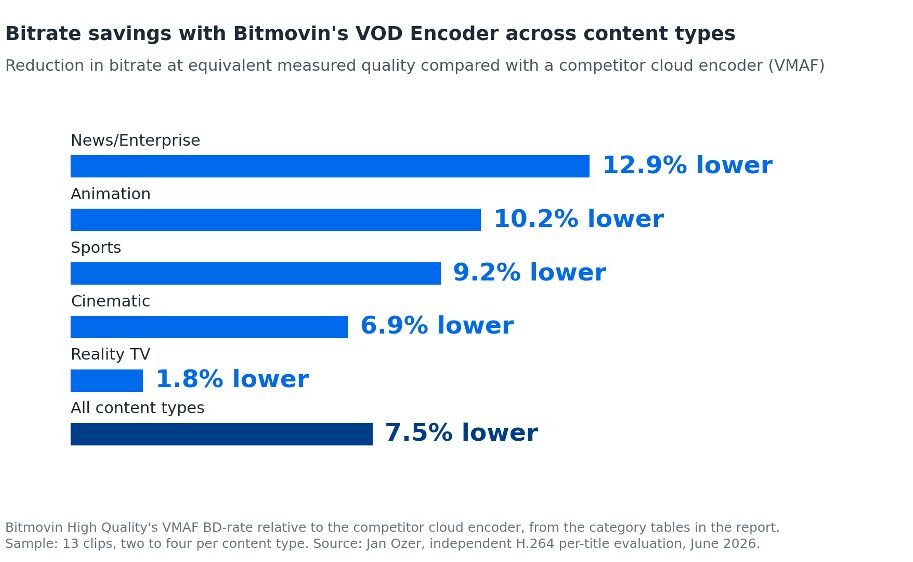
Figure 4. Bitrate savings by content type.
News/Enterprise showed the largest saving, and the gaps were wider still on SSIM, where High Quality needed 28.8% less bitrate for News/Enterprise and 22.6% less for Sports. These Bitmovin-relative figures are lower than the cloud-relative ones earlier in this article, because BD-rate isn’t symmetric: a 7.5% saving for Bitmovin overall and 10.1% extra bitrate for the cloud encoder describe the same comparison from opposite sides. With only two to four clips per category, these findings are directional, and engineers should validate performance using representative content from their own libraries.
From BD-rate to delivered bitrate
BD-rate compares whole ladders, while delivered bitrate shows what viewers actually receive under a given viewing pattern. Ozer modeled two viewing profiles, each describing the share of viewers connecting at different connection speeds, and calculated the highest-quality rendition each viewer would receive. In the top-heavy profile, about 72% of viewers connect at 6 Mbps, while in the mobile profile most viewers connect at between 800 kbps and 2.2 Mbps. On the top-heavy profile, High Quality’s average delivered bitrate was 13.6% lower than the cloud encoder’s at nearly identical measured quality, and on the mobile profile it was 8.4% lower with the best overall quality of the three.
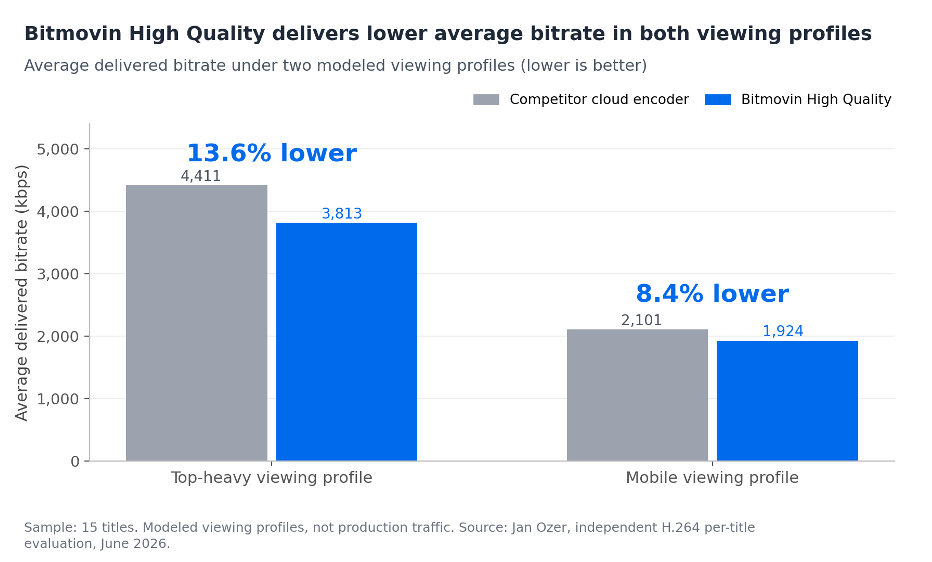
Figure 5. Modeled delivered bitrate.
Maintaining quality across challenging frames
For encoding engineers, quality consistency matters because an acceptable average quality score can conceal individual frames with substantially lower quality. Examining minimum-frame and lower-percentile results helps identify potential problems that aggregate scores may overlook. Ozer examined top-rung consistency and the single worst frame in each video, and Bitmovin’s High Quality preset produced the strongest quality floor of the three encoders:
- Its top rungs averaged the highest VMAF, 92.8, with the least variation across titles: a standard deviation of 3.3, against 4.6 for the competitor cloud encoder.
- Its lowest-scoring title still reached 85.0 VMAF at the top rung, against 81.3 for the competitor cloud encoder.
- Its lowest single-frame VMAF was 61.3, compared with 39.6 for the cloud encoder, a difference of 21.7 VMAF points.
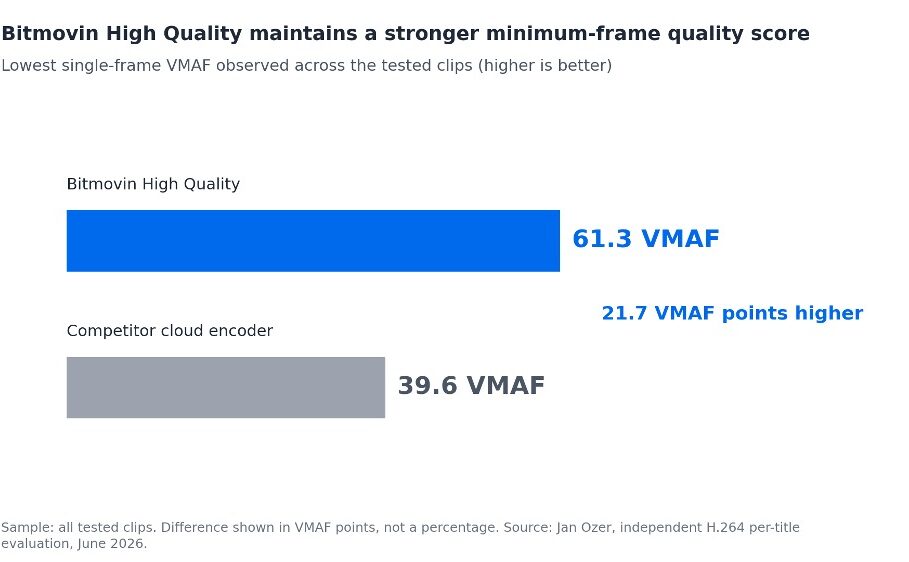
Figure 6. Minimum-frame quality.
That consistency did not come from using more bitrate: the cloud encoder used about 12.6% more bitrate on its top rungs than High Quality and still scored slightly lower.
Technical performance and trade-offs
In Ozer’s benchmark, both sides of encoding efficiency, how the ladder is built and how well each rendition is encoded, favored Bitmovin. Compared with the competitor cloud encoder, Bitmovin’s VOD Encoder generated ladders that more closely followed the optimized reference, while its High Quality preset delivered stronger measured quality at equivalent bitrate levels.
Encoding time introduced a different trade-off. The competitor cloud encoder was the fastest in the test, averaging 3 minutes 52 seconds per clip, compared with 5 minutes 17 seconds for Bitmovin’s Standard preset and 10 minutes 26 seconds for High Quality. These results reflect the short clips tested rather than expected processing times for full-length content.
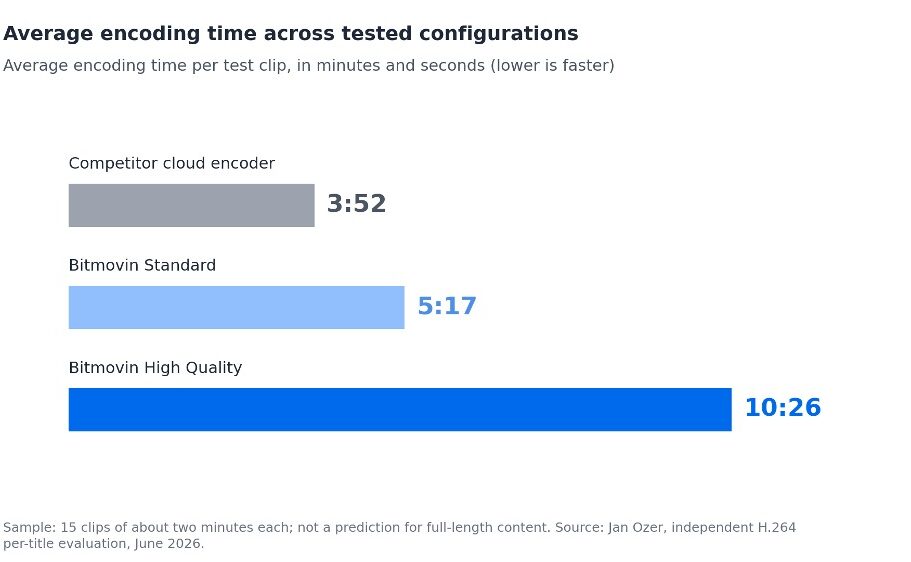
Figure 7. Encoding time.
Bitmovin’s Standard and High Quality presets produced nearly identical ladders, although High Quality achieved stronger measured quality through its additional encoding effort. This gives engineers different configuration options depending on their quality and processing requirements.
Frame rate was the other notable difference. In its tested configuration, the competitor cloud encoder reduced 60 frames per second sources to 30 frames per second after the second or third rung. For high-motion content such as sports, keeping the source frame rate preserves smooth motion, while halving it saves bits at the cost of motion detail.
Because the two 60 frames per second clips no longer matched their source frame rate across the full ladder, they were left out of the overall quality comparison. When testing high-frame-rate content, it’s worth checking the frame rate of every rung, not only the top one.
Configuration flexibility
Automated ladder generation can reduce manual configuration, but engineers still need control when default settings don’t meet their playback or delivery requirements. This becomes particularly important when supporting legacy devices, preserving specific resolutions, or maintaining consistent bitrate spacing. Ozer rated both services as easy to configure, and his evaluation found that Bitmovin provides more options to customize its Per-Title ladders, allowing engineers to establish constraints while continuing to benefit from automated optimization:
- Rung count and resolution can be bounded at both the top and bottom of the ladder.
- Specific resolutions can be forced into the ladder.
- Bitrate jumps between rungs can be held within a set range.
- H.264 profiles can be mixed per rung, so the lowest rungs stay playable on older devices.
- Quality can be tuned with a constant rate factor (CRF) target, which controls the quality/bitrate tradeoff, a complexity factor and three presets.
These controls give engineers additional flexibility when balancing automated ladder generation with platform-specific playback requirements. The competitor cloud encoder does offer one control Bitmovin doesn’t: a cap on output frame rate.
How to interpret the findings
Ozer describes his results as directional rather than predictive, and a few qualifications are worth keeping in mind:
- The test covers H.264 only, and Bitmovin’s VOD Encoder as tested in June 2026.
- The sample is relatively small, especially at the level of individual content categories.
- The clips are about two minutes long, and encoding behavior and timing could differ on longer content.
- The competitor cloud encoder was tested with its default settings. Limiting its rung count could reduce its rendition overhead, though possibly at a cost to quality and ladder efficiency.
- Delivered bitrate comes from two modeled viewing profiles, not from production traffic.
Benchmarking your own content
The most reliable way to validate these findings is to run the same kind of comparison on your own catalog. A practical checklist:
- Select representative assets across your content categories and frame rates.
- Compare bitrate and resolution choices across the full encoding ladder, not only the top rung.
- Evaluate VMAF and SSIM at comparable quality levels.
- Inspect lower-percentile and minimum-frame scores for quality consistency.
- Compare encoding times across the available presets.
- Examine rung spacing and rendition counts.
- Validate the findings against your own content and production requirements.
Ozer’s independent benchmark demonstrates that H.264 Per-Title Encoding efficiency depends on both intelligent ladder construction and the quality of individual encodes. Across the tested content, Bitmovin’s VOD Encoder demonstrated measurable advantages in bitrate efficiency, video quality and encoded storage requirements. For engineers evaluating their encoding workflows, the most valuable next step is to test representative content using comparable quality measurements and encoding configurations.
Bitmovin’s VOD Encoder keeps improving beyond what this benchmark for H.264. To see how the latest HEVC and AV1 updates deliver the same picture quality with fewer bits, read our Encoder V3 overview.
Teams interested in benchmarking Bitmovin’s VOD Encoder against their existing workflows can start a free trial.