


TL;DR
- The Model Context Protocol (MCP) is an open standard that allows AI systems to access external data sources and tools through a structured, contextual interface
- MCP servers expose well defined tools that let large language models query analytics, configuration, and operational systems using natural language
- This creates a new entry point to data that complements existing APIs and dashboards rather than replacing them
- MCP is especially useful for exploratory analysis, cross functional access, and ad hoc investigations where building custom dashboards or queries is inefficient
- MCP is not designed for high volume automation, production monitoring, or repetitive reporting, where traditional APIs and dashboards remain the better choice
- In agentic workflows, MCP provides discovery and context, while orchestration and execution continue to live in application logic and existing services
Table of Contents
Understanding MCP: A New Way to Access Your Data
As AI systems move beyond simple question answering and toward agent driven workflows, access to reliable, structured data has become a central challenge. Large language models are effective at reasoning over natural language, but they still depend on well defined interfaces to interact with real systems such as analytics platforms, operational tools, and content services. Without a consistent way to expose those systems, teams are often forced to build custom integrations or rely on fragile prompt based approaches that are difficult to maintain at scale.
The Model Context Protocol, or MCP, addresses this problem by providing a standardized way for AI systems to discover and use external tools with the context they need. Rather than replacing existing APIs or dashboards, MCP introduces an additional interaction layer that allows both technical and non technical users to query data and functionality using natural language. This article explains what MCP is, where it adds value, where it does not, and how it fits into modern agentic workflows across data intensive environments such as video and streaming platforms.
What is MCP?
The Model Context Protocol is an open standard that enables AI systems to connect with external data sources and tools through a standardized interface. Think of it as a bridge or API with context: on one side, you have an LLM that understands natural language and on the other, you have some data system (analytics, chat, documents) with their own APIs and schemas. MCP provides a consistent way to connect them by creating a set of tools with their own context an LLM can understand, so it can make a decision on which tool to use for the task at hand.
Anthropic introduced MCP in late 2024, and it’s since been adopted by OpenAI and Google, integrated into development tools like VSCode and Cursor, and implemented by companies across the industry. The protocol is now managed by the Agentic AI Foundation under the Linux Foundation, with backing from major tech companies.
At Bitmovin, we currently have deployed our MCP servers to expose our Observability and Stream Lab data and functions through a natural language interface. It offers a new way to interact with our products; instead of learning our API syntax or navigating dashboards, users can simply ask questions. In addition, Bitmovin’s AI Hub will also incorporate agentic workflows which will utilize MCP tools, drawing data and functionality from Bitmovin products such as Observability, Stream Lab, and AI Scene Analysis.
Why MCP Matters: Democratizing Data Access
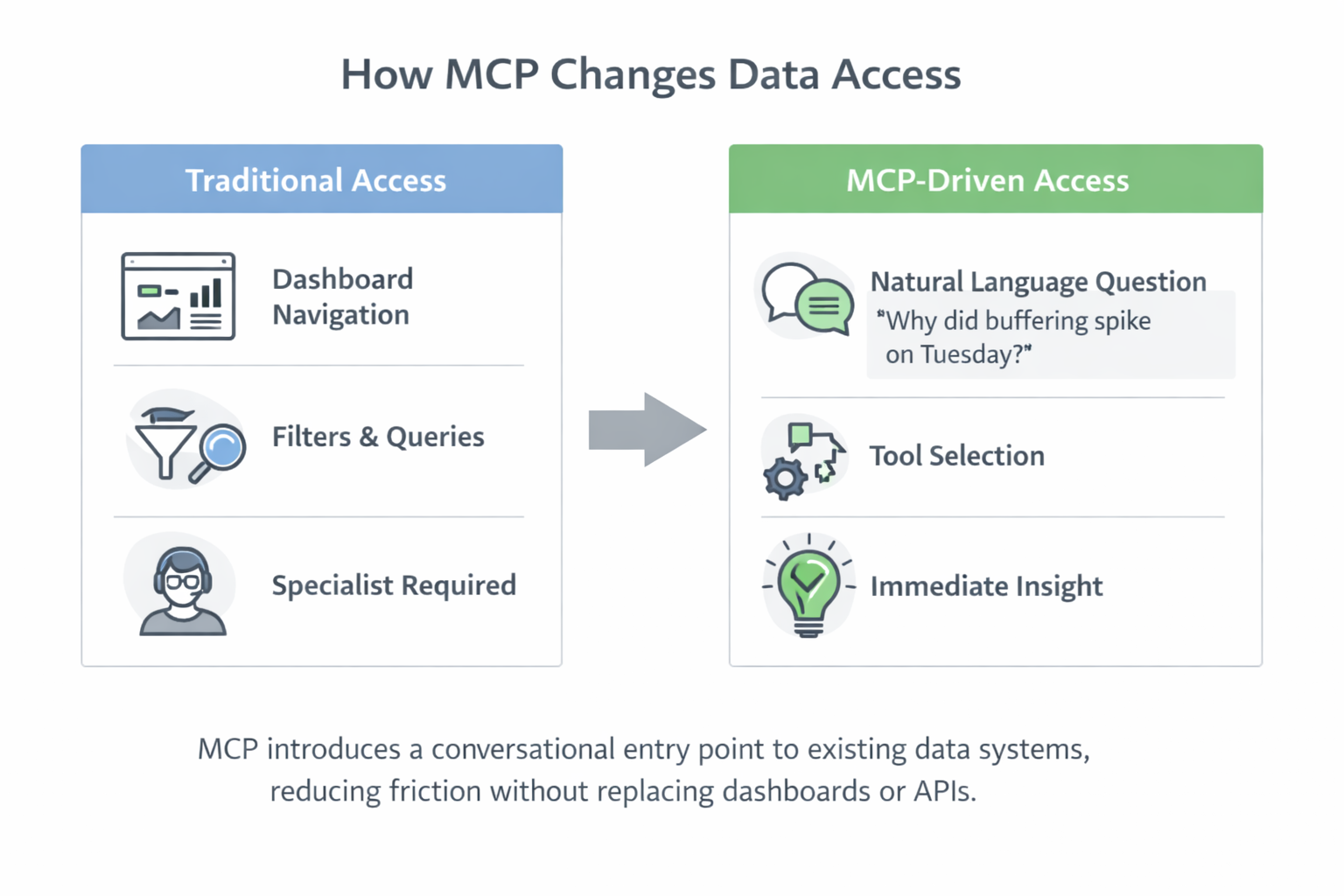
MCP introduces a new entry point to data that reduces friction across teams. Instead of requiring users to understand dashboards, query languages, or API structures, MCP allows questions to be expressed in natural language and mapped to well defined tools behind the scenes. The underlying data systems remain unchanged.
Consider a common scenario. During a meeting, someone asks, “Why did buffering spike on Tuesday afternoon?” Traditionally, answering this requires navigating analytics dashboards, applying filters, and interpreting results, often with help from someone who knows where to look.
With an MCP server in place, that same question can be asked directly through a conversational interface. The server selects the appropriate tool, retrieves the relevant data, and returns an answer without requiring manual query construction.
This changes how teams work:
- Product teams can explore playback quality trends without relying on engineering.
- Customer success teams can investigate issues in real time during customer calls.
- Executives can ask follow up questions and explore patterns without waiting for reports.
- Engineering teams stay focused on building and maintaining core systems rather than ad hoc analysis.
When MCP Shines
MCP is most effective when the goal is understanding rather than automation. It works best in situations where users need to explore data, ask follow up questions, or combine information from multiple systems without knowing the exact structure of the query in advance.
MCP servers excel in specific scenarios:
- Exploratory Analysis: When you don’t know exactly what you’re looking for, conversational queries let you iterate quickly. “Show me error rates for streams over 4K resolution in Europe last week” leads naturally to “Now break that down by device type” without rebuilding queries or switching tools.
- Cross-Functional Access: Teams with varied technical abilities can all engage with the new data sources together. Multiple MCP servers can be connected at once, meaning users can ask questions that combine data from Bitmovin Observability and other sources like their CMS, support channels, or other analytics systems for a more complete picture.
- Proactive Assessment: With the tools to connect you to your data, and the context around them, using an MCP connection to ask ‘what should I pay attention to today?’ is the start of proactive problem solving and automated root cause analysis.
- Ad-Hoc Investigations: Questions that don’t justify building custom dashboards or reports become trivial. “How many viewers watched at least 30 minutes during last Tuesday’s livestream?” is a one-off query that MCP handles perfectly.
- Onboarding and Discovery: New team members can explore data without first learning your query language, dashboard navigation, or API documentation. The conversational interface is self-documenting. You learn what’s possible by asking.
When Not to Use MCP
All this said, MCP isn’t a panacea. It can excel in the above scenarios but it isn’t the right tool for everything. Here’s where traditional approaches still make more sense:
- Production Monitoring: Real-time alerting and dashboards remain essential for ongoing system health. Dashboards with high-information density, clear visual indicators and automated notifications are purpose-built for this.
- High-Volume Programmatic Access: If you need to make thousands of API calls or integrate into existing automated systems, direct API access is more efficient. MCP adds a conversational layer as well as having it’s own context window that can be easily overrun with high-volume data processing.
- Transactional Operations: While our MCP servers support some actions (like triggering Stream Lab device tests), high-stakes operations (especially destructive ones like deletions) are better handled through traditional interfaces with explicit confirmations and audit trails, leaving no room for misinterpretation in the LLM’s context.
- Routine Reporting: If someone needs the same report every week, build a dashboard or scheduled export. MCP can be used to help build this report but isn’t good for static repetitive use cases.
We see MCP as complementary to our existing products. The Observability MCP server sits alongside our Observability dashboard and API as they serve different use cases. Customers can connect to the MCP server directly in their own agentic workflows, while similarly, our upcoming Dashboard Assistant will use the Observability MCP server internally to power conversational queries.
Technical Considerations: Context Windows
Building effective MCP servers requires careful architecture, particularly around context window management. A context window is the amount of information an AI can process at once. If your MCP tools aren’t designed thoughtfully, you can easily overwhelm an LLM by exposing too much data or overly complex schemas, and put a halt to your workflow pretty quickly.
It’s no different to traditional API design; you wouldn’t return an entire database from a single API call for example, so the principle also applies to MCP in that tools should return focused, relevant data. Anthropic recently published guidance on architecting MCP tools with code execution capabilities, for the exact reason of not overwhelming the context window.
Bitmovin’s partnership with Alpic has also been valuable regarding tool design and common pitfalls in this area given they have been working with MCP since early in its lifecycle.
Beyond MCP: Agentic Workflows
MCP is merely a component in a larger agentic system, not a complete solution on its own. The real power emerges when you combine multiple MCP servers with traditional APIs and other tools to accomplish complex workflows.
Consider a workflow we’re building: “Create a 30-second highlight reel from yesterday’s livestream focused on audience engagement peaks.” This single request requires:
- Querying Bitmovin’s Observability MCP server to identify the stream and engagement data
- Using Bitmovin’s AI Scene Analysis Search MCP tool to find the specific relevant moments
- Calling Bitmovin’s Encoding API to prepare the clips
- Playing back the clips in Bitmovin’s Player to generate a preview
No single tool handles this end-to-end. MCP servers provide the conversational entry points for data discovery, but the actual workflow orchestration requires proper error handling and coordination across multiple services.
This is the purpose of Bitmovin’s AI Hub; where we can showcase how the integrated capabilities of Bitmovin products can be used as part of larger agentic workflows. The AI Hub will host a set of agentic examples using a subset of Bitmovin products, like Observability, Stream Lab, and AI Scene Analysis, which customers can either take and make use of, or use as inspiration for their own agentic workflows with Bitmovin products. A few examples are our Vertical Clipping agent workflow, Voice-activated Seeking and Movie Companion.
Who This Is For
MCP servers are particularly valuable for:
- Anyone frequently querying data: Connecting to a data source via an MCP server gives anyone a new way to process and perspective on understanding their data sets
- Organizations with Data Silos: If you have rich analytics, configuration systems, or metadata but often access is limited by training on query language or data structure, MCP gives a unified natural language entry point to those data sources.
- Teams Building Agentic Systems: Developers creating AI agents that need to query video infrastructure, analyze performance, or search content can integrate our MCP server to enable the building blocks.
- Product Teams Exploring Use Cases: When you’re in discovery mode and trying to understand if certain data exists or what patterns might be worth investigating, conversational access can aid experimentation.
What’s Next for Bitmovin
Bitmovin’s Observability MCP server is available now, and you can connect it to Claude by following our documentation. We’re releasing Stream Lab and AI Scene Analysis MCP servers in early 2026, as well as example workflows of how these products and tools can work together in agentic systems, which will be showcased in our AI Hub.
MCP isn’t a magic solution to AI workflows, but it’s a valuable standardized entry point that works alongside APIs, dashboards, and traditional integrations. The protocol is young, the patterns are still emerging, and we’re excited to see how it evolves as more of the industry adopts it.
FAQs
What is MCP (Model Context Protocol)?
MCP is a standardized protocol that enables AI models and agents to securely access external data sources and tools. It defines how context, permissions, and system interfaces are structured so models can interact with enterprise systems in a controlled way.
How does MCP differ from traditional API integrations?
Traditional integrations require building custom connections between each model and each data source. MCP introduces a standardized intermediary layer, allowing models to access multiple systems through a unified interface, reducing integration complexity and vendor lock-in.
What are agentic workflows?
Agentic workflows refer to AI systems that can autonomously plan and execute multi-step tasks. Instead of producing a single response, an agent can retrieve data, call tools, evaluate intermediate results, and adapt its approach dynamically.
Does MCP replace APIs?
No. MCP does not eliminate APIs; it standardizes how AI systems interact with them. APIs remain the underlying mechanism, while MCP defines how AI agents discover, authenticate, and utilize them effectively.
How does MCP improve security?
MCP supports scoped permissions, defined access boundaries, and controlled context sharing. This reduces the risk of unrestricted data exposure when AI systems interact with internal infrastructure.
Can MCP work with different AI models?
Yes. MCP is designed to be model-agnostic. It allows multiple AI systems to access the same data infrastructure through a common protocol, supporting interoperability across providers.