
TL;DR
- V.I.B.E. (Video Intelligence with Brand Embeds) uses BytePlus (Bytedance) generative AI APIs to inject contextually relevant brand placements directly into video content.
- A creation dashboard handles shot detection, AI-driven scene description, and ad placement definition, outputting a modified video alongside a structured placement JSON.
- The viewer app, built on Bitmovin’s Player, surfaces those placements in real time during playback.
- BitRemote turns any smartphone into a connected remote via QR code scan, delivering product cards in sync with the video and enabling one-tap purchasing, with no app or account required.
Ad opportunities are being missed. Someone is watching a thriller on a streaming service. A character pulls on a jacket that looks incredible. They reach for their phone, open a browser, try to describe what they just saw, scroll through three pages of results, and by the time they find something close, the scene is gone, the moment is gone, and the sale is gone. We kept coming back to this problem. The intent is there. The technology exists. Nobody had connected the dots.
So for Bitmovin’s Q2 2026 hackathon, we decided to try. Working with Bytedance’s BytePlus APIs, the four of us had two days to build something that could possibly close that gap. What came out of it was V.I.B.E., Video Intelligence with Brand Embeds, a system that puts brand placements inside the video itself and gives viewers a frictionless way to act on what they see, directly from their phone.
The problem with video advertising today
We started by writing down everything that is broken about how video advertising works right now. The list got long quickly:
- Ads are passive and disconnected from what is happening on screen.
- AI is barely being used, and where it is, it is mostly just targeting and bidding, not the content itself.
- Cross-device integration is basically nonexistent. You see something on TV, you have to pick up your phone, open a browser, and start searching from scratch.
- The path from “I want that” to “I bought that” has too many steps, and viewers drop off at every one of them.
The deeper issue is that video advertising has not really evolved with the medium. Pre-rolls and banner overlays were designed for a world where the viewer was passive and the TV was a one-way pipe. Streaming changed that. Viewers have phones in their hands. They are already connected. The infrastructure to make advertising genuinely interactive is sitting right there, and almost nobody is using it.
What we built
V.I.B.E. is made up of three components that work together end to end. We built all three during the hackathon, which meant a lot of parallel work and a few late nights.

The three components of V.I.B.E.: creation dashboard, viewer app, and BitRemote.
The creation dashboard is where a content owner prepares a video for brand integration. The viewer app, built on Bitmovin’s Player, plays back the enriched content and surfaces ads at the right moment. And BitRemote is the phone-based companion that handles both playback control and the commerce experience. Each piece feeds into the next, and the whole thing runs without any app download or account creation on the viewer’s side.
The creation dashboard
The dashboard is where the content pipeline starts. You load a source video and the system splits it into individual shots automatically. Each shot then gets analyzed by BytePlus AI models, which generate a text description of what is happening in the scene. That description becomes the basis for both the ad logic and the visual modification.
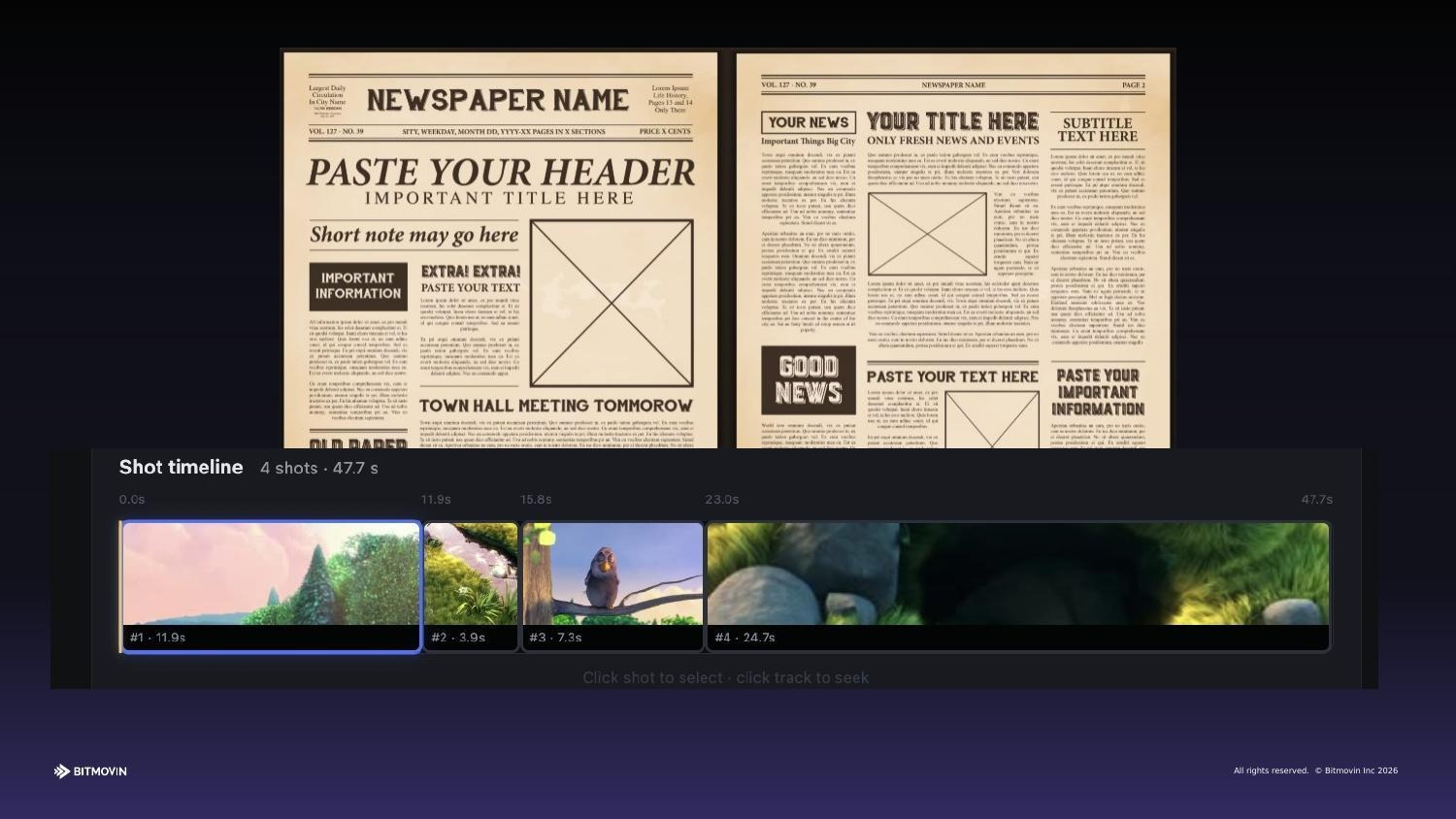
The creation dashboard with shot detection applied to the demo video.
The part we were most pleased with is that the descriptions are editable. You can tweak what the AI generates before anything gets rendered, which gives content owners real control over the output. From there the workflow goes like this:
- Shot descriptions are refined and confirmed by the content owner.
- BytePlus image generation takes the first frame of each shot plus the text description and produces a modified version of the scene with the brand element naturally incorporated.
- Ad placements are defined per clip, pairing specific brands or products with specific scenes.
- The final output is the modified video plus a structured ad placement JSON file that drives everything downstream.
The brand integration ends up inside the content rather than on top of it. That distinction matters. A product appearing naturally in a scene is a fundamentally different experience from a pre-roll interrupting the flow. With BytePlus’s newer generative video models, you could take the full clip as input rather than just a single frame, which would make the modifications even more accurate. We used the image model for the hackathon but the upgrade path is clear.
The viewer app and BitRemote
The viewer app is built on Bitmovin’s Player and consumes the ad placement JSON from the dashboard. When a modified scene plays, the relevant product card gets pushed to the viewer’s phone in real time through BitRemote. The Player integration is lightweight by design. We did not want this to be something that only works with a custom setup. It should be easy to drop into any existing Player deployment.
BitRemote is what makes the whole thing feel like a real product rather than a proof of concept. You scan a QR code in the player, and your phone is live. No app, no account, no friction. Once connected, the phone does two things at once: it gives you playback control, and it becomes your shopping interface.
We were deliberate about keeping the purchase flow as short as possible:
- Scan the QR code once and the phone connects live to the session.
- Product cards appear on the phone in sync with what is on screen.
- One tap goes from the product card to purchase.
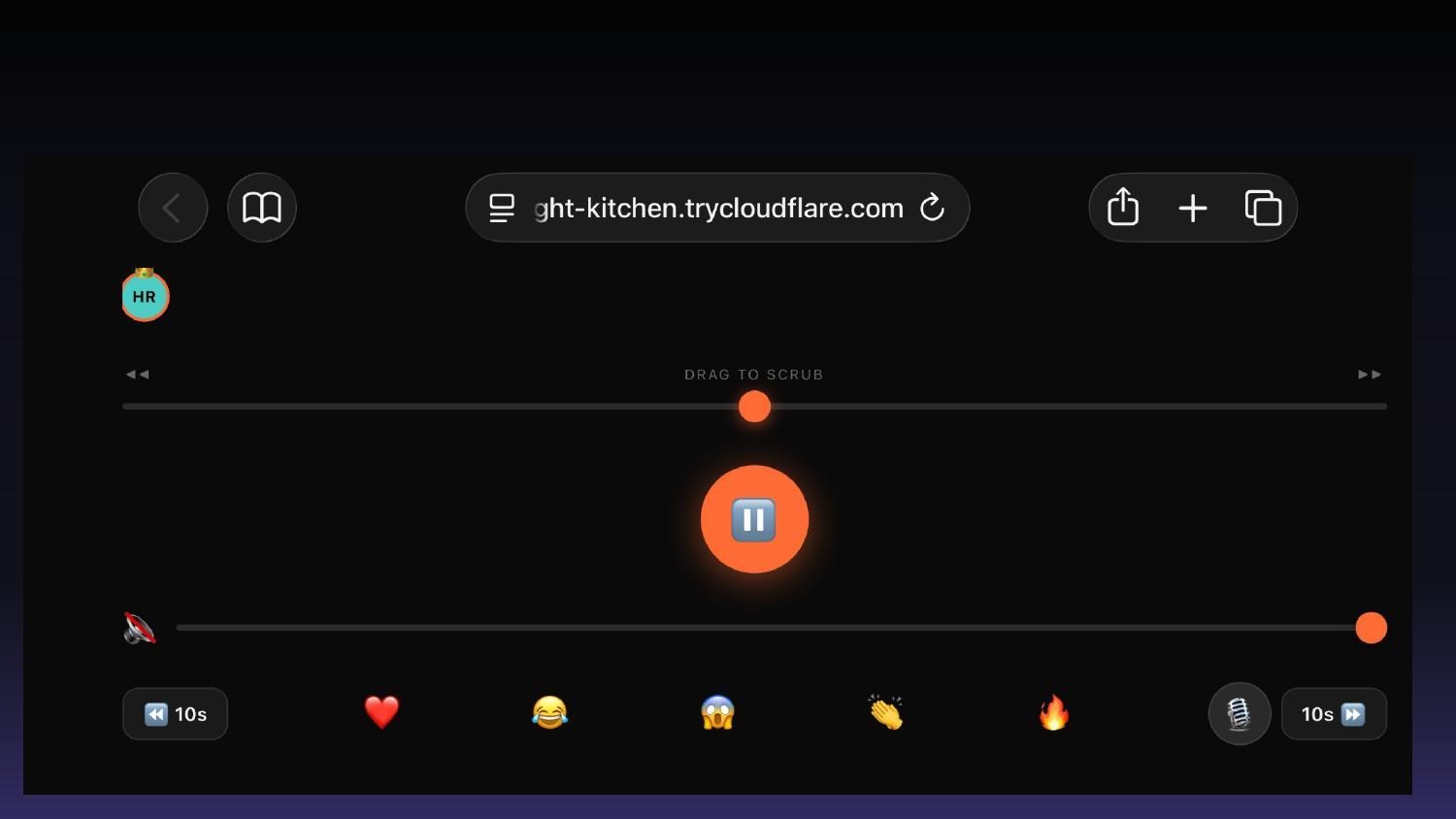
The full BitRemote interface: scrub bar, volume, reactions, and voice control.
We also built in multiplayer support, which turned out to be one of the more fun things to demo. Everyone in the room can scan the QR code and join the session. One person is the captain with full playback controls, the rest are co-pilots. Voice controls, haptic scrubbing feedback, and emoji reactions in the player all work across all connected devices. It started as a feature we threw in for fun and ended up being the thing that got the most reaction during the presentation.
What we learned
The biggest thing we took away from this build is that the pieces already exist. Bitmovin’s Player, BytePlus generative AI, a simple web-based remote. None of this required us to invent new infrastructure. The work was in connecting them correctly and making the experience feel seamless rather than bolted together.
We were genuinely surprised by how good the BytePlus image generation output was. Going in we expected the brand integrations to look obviously AI-generated. Some of them do, but a lot of them look like the product was always there. The quality is good enough that this is a real thing you could ship, not just a hackathon demo. Using the full video model instead of single frames would close that gap further.
The other thing that became clear was how right it felt to keep the commerce experience on the phone rather than trying to build it into the TV interface. Viewers already have their phones in their hands. The QR code scan takes three seconds. Asking someone to navigate a purchase flow with a TV remote is a completely different ask, and not a good one. Putting the action where the attention already is turned out to be the right call.